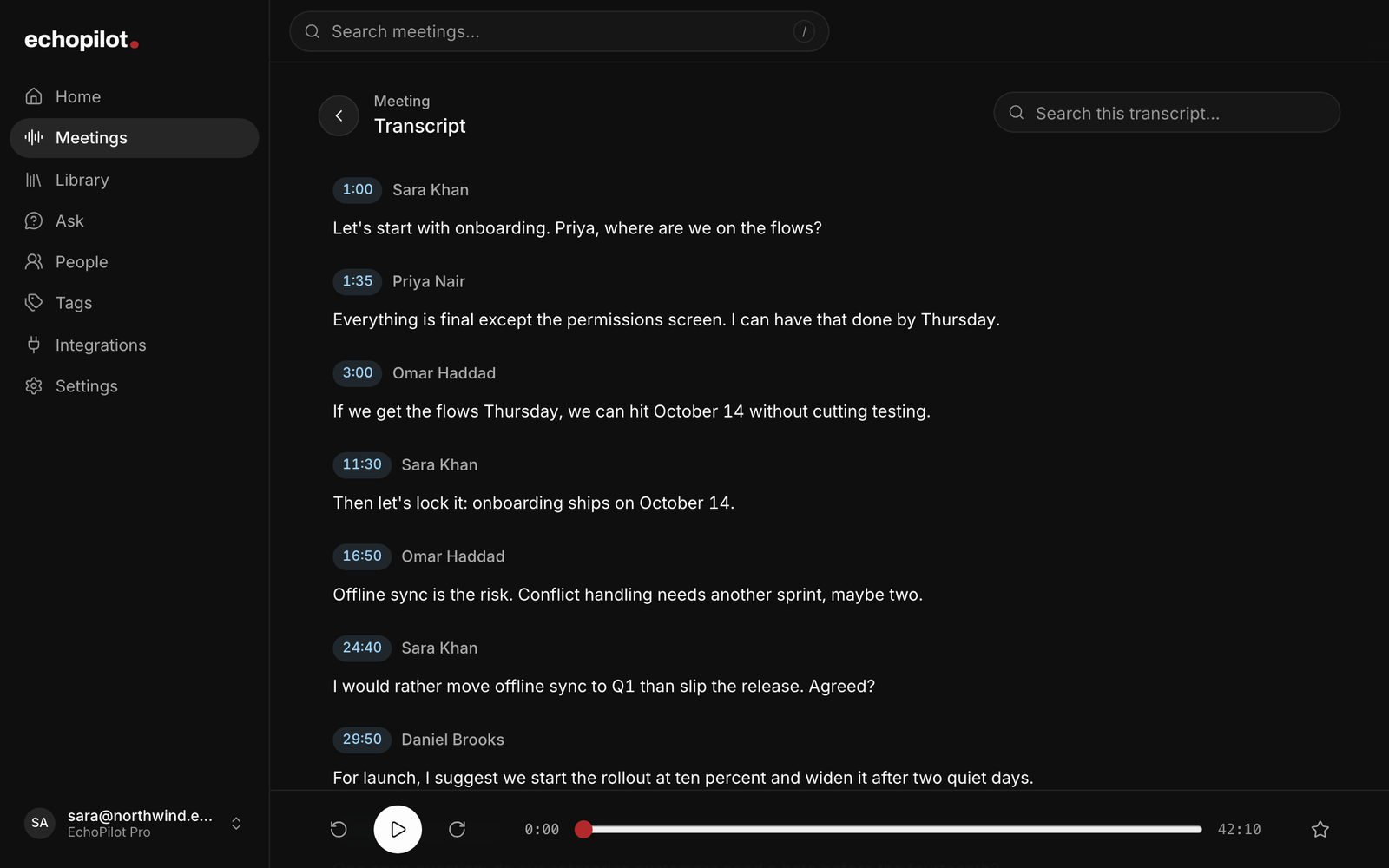
A wrong name in AI meeting notes is rarely one mistake. The recogniser misheard “Ken” as “John Smith” at minute fourteen, the summary repeated it, a key point repeated it, and the task card now says John Smith owes the report. Retyping the notes fixes the copy in front of you and leaves the transcript, the cards and the next answer from the assistant wrong. The fix that holds is to correct the mistake where it lives, and that is almost always the transcript, then let everything built on it follow.
Three kinds of mistake, three places to fix them
The recogniser misheard a word. A name, a product, a number, a date. The minutes repeat the transcript confidently, so the error shows up in several sections at once. Fix the transcript line. Every other copy is downstream of it.
The minutes misread a correct transcript. The transcript says the team agreed to delay the launch; the summary says cancel. Nothing is wrong with the evidence, only with the reading of it. The fix is to rebuild the minutes with a note about what they got wrong, not to edit the transcript into saying something clearer.
The wrong person got the words. The speaker labels put the candidate’s answer in the interviewer’s mouth, so the minutes name the wrong owner for a commitment. Rename or merge the speaker, then rebuild. Editing the owner on one card leaves the minutes and the next card wrong.
The rule the three share: fix the evidence when the evidence is wrong, fix the reading when the reading is wrong, and do not confuse the two.
Fix the transcript first
A transcript correction should keep the original underneath. If the tool replaces the words outright, you lose the proof that the recording ever said something else, and you lose the ability to check your own correction later. Keep the audio, keep the original text, and make the corrected line the one everything reads from now on.
Correct every occurrence in a line, not the first one. A name that was wrong twice in one sentence is wrong twice, and a half-corrected line is worse than an uncorrected one, because it looks checked.
Rebuild, do not rewrite
Once the transcript is right, the minutes are out of date, and the honest tool says so. Rebuild them as a new version rather than editing paragraphs by hand: the rebuild reads the corrected transcript, so the summary, the key points and the commitments all change together, and the old version stays in the history in case the rebuild reads something differently.
Before you accept a rebuild, read the sections it changed. A rebuild is a fresh reading of the whole recording, so a section that never mentioned the wrong name can still be reworded. That is normal; it is also why the previous version should stay one tap away.
Then the cards
Action cards are copies of a commitment, and some of them have already left the building. A card still waiting for your approval can simply be corrected. A card already sent to Todoist or Notion is a different matter: correct EchoPilot’s copy by all means, but the copy in the other app does not change by itself, and a good tool marks the update as pending on the card rather than pretending it went through.
What to leave alone
Do not correct the transcript to say what you wish had been said. A transcript is a record; if the number quoted in the meeting was wrong, the minutes should say the number that was quoted, and the correction belongs in the follow-up. And do not edit a summary to fix a transcription error. It will look fixed until the next rebuild, or the next question to the assistant, puts the old words back.
How EchoPilot does it
- Corrections keep the evidence. Fix a misheard line in the transcript and the original audio and the original text stay underneath. Minutes built on the old wording are marked out of date, so you can see what your correction affects.
- Rebuilds are versions. On Pro, rebuild the minutes from the corrected transcript and preview the new version before it replaces the current one. Every earlier version stays restorable.
- Speakers are honest. On supported Pro meetings the transcript carries speaker turns you can rename or merge for that meeting, and minutes written before the names were known show a rebuild notice. When reliable attribution is not available, the transcript is shown without names and says so.
- Ask reads the correction. A question about the meeting is answered from the corrected words, so the assistant does not keep quoting the name you fixed.
What is next
In the next release of the apps, the meeting’s Ask bar takes instructions as well as questions. Say “it was Ken, not John Smith, and five days not seven”, and EchoPilot shows a preview: the transcript lines it will correct, the cards that hold the words (a card already sent starts switched off, with the reason), and the rebuild that applies the fix, with the honest note that other sections can be reworded. Nothing changes until you approve the preview, and every change can be undone. It is built on the same rules as this guide: the evidence first, then the reading, then the cards, with the old version kept.