One capture, however long it runs
A board review or a workshop, on Pro. Audio is written to disk in short segments as it goes, so a crash costs the last few seconds rather than the meeting. No signal needed; it uploads later.
The outcome, the decisions and who made them, the action items and notes tied to the moment they were said, in the format that fits the meeting. Up to four hours, on the device already in the room.
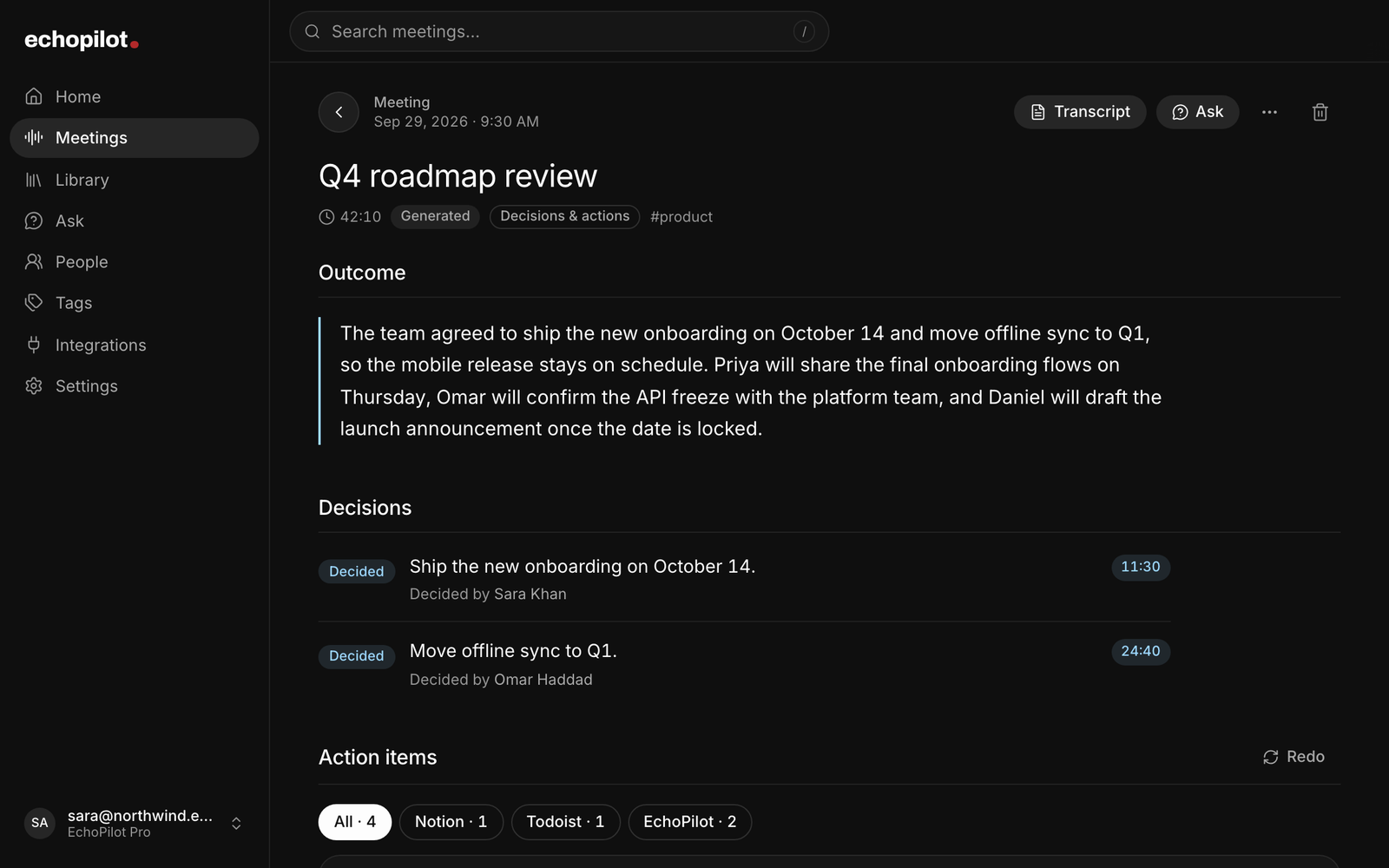
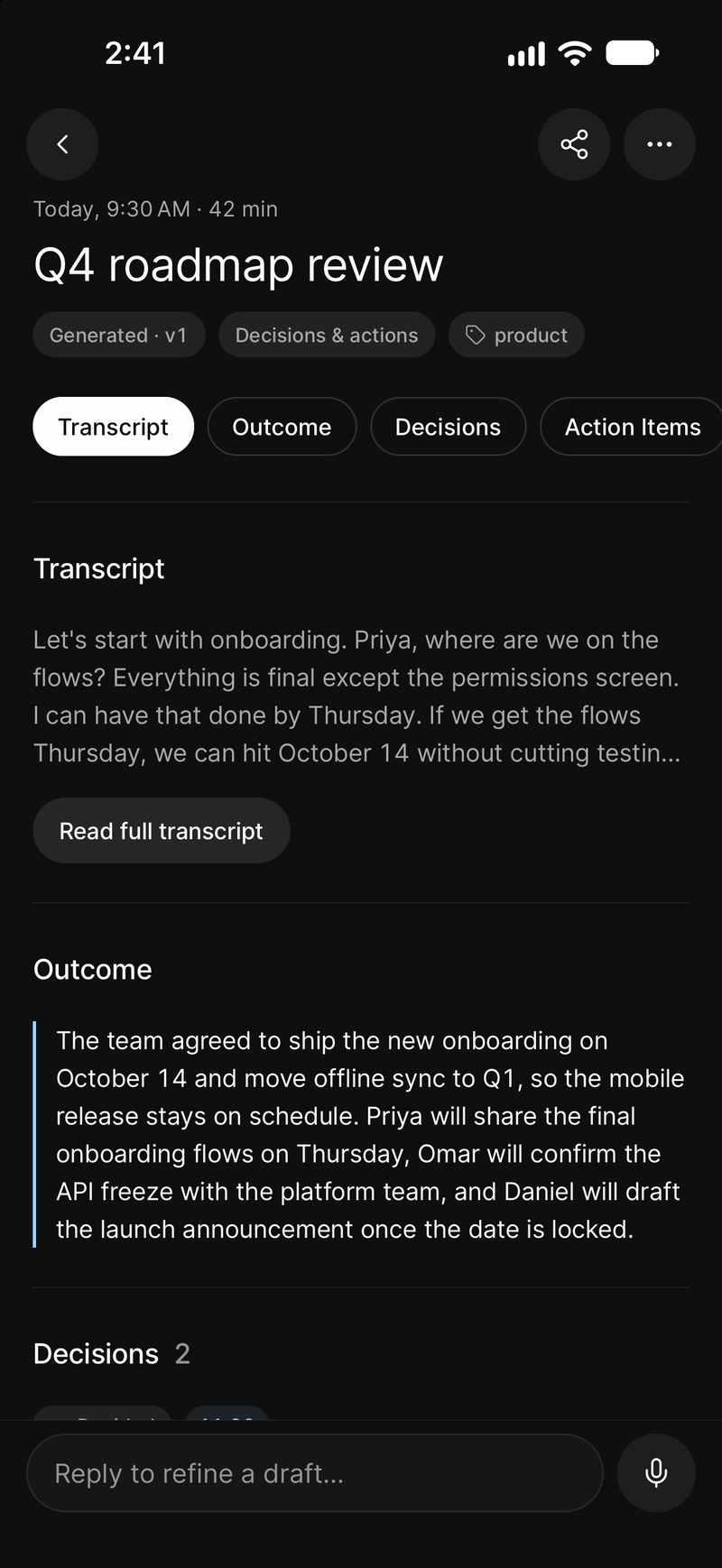
The summary, chapters, key points and action items, each tied to the moment it was said, a transcript you can search, and every commitment drafted as a card you approve.
Stop the recording and this is what is waiting: a written record you can read in two minutes, and the work that came out of it.
One recording comes back as seven things, not one document.
Named for what was discussed, not the date.
What happened and what was decided, in a paragraph.
The meeting in chapters, readable in order.
Each carries its moment. Tap it and hear the sentence.
The commitments people made, drafted as cards with a destination chosen.
Anything you marked while it was being said.
Searchable, synced to the audio from any line.
The board reviewed Q3 against plan. Enterprise renewals carried the quarter while self-serve missed forecast. The team agreed to hold current pricing and revisit packaging in Q4.
See how a card becomes a task →
Search the transcript, step through the matches, and tap any line to hear that exact moment. The highlight follows the audio as it plays, so reading and listening stay together. The demo below is real: press play.
20:48So if we move the tier now, we reopen every renewal conversation we just closed. I'd rather hold.
21:14Agreed. We hold pricing. Packaging is the lever. Let's bring three packaging options back to the board.
22:02That works. I'll own the options doc and circulate it Monday, before the board sees it.
[ audio unavailable 24:10 – 26:40 ]
26:40Back to the hiring plan. Two engineering roles are still open against the old forecast.
Skipped 2m 30s of unavailable audio
Interactive demo A sample meeting with synthesized voices. Playback, search, and seeking are real.
A board review or a workshop, on Pro. Audio is written to disk in short segments as it goes, so a crash costs the last few seconds rather than the meeting. No signal needed; it uploads later.
A call, a Bluetooth handover or a force-quit cannot lose the meeting. The gap is drawn on the transcript instead of being quietly stitched over.
Fix a misheard line or reword the summary. The original stays restorable, and anything built on the old wording is marked out of date rather than silently kept.
The outcome, and every section one tap away
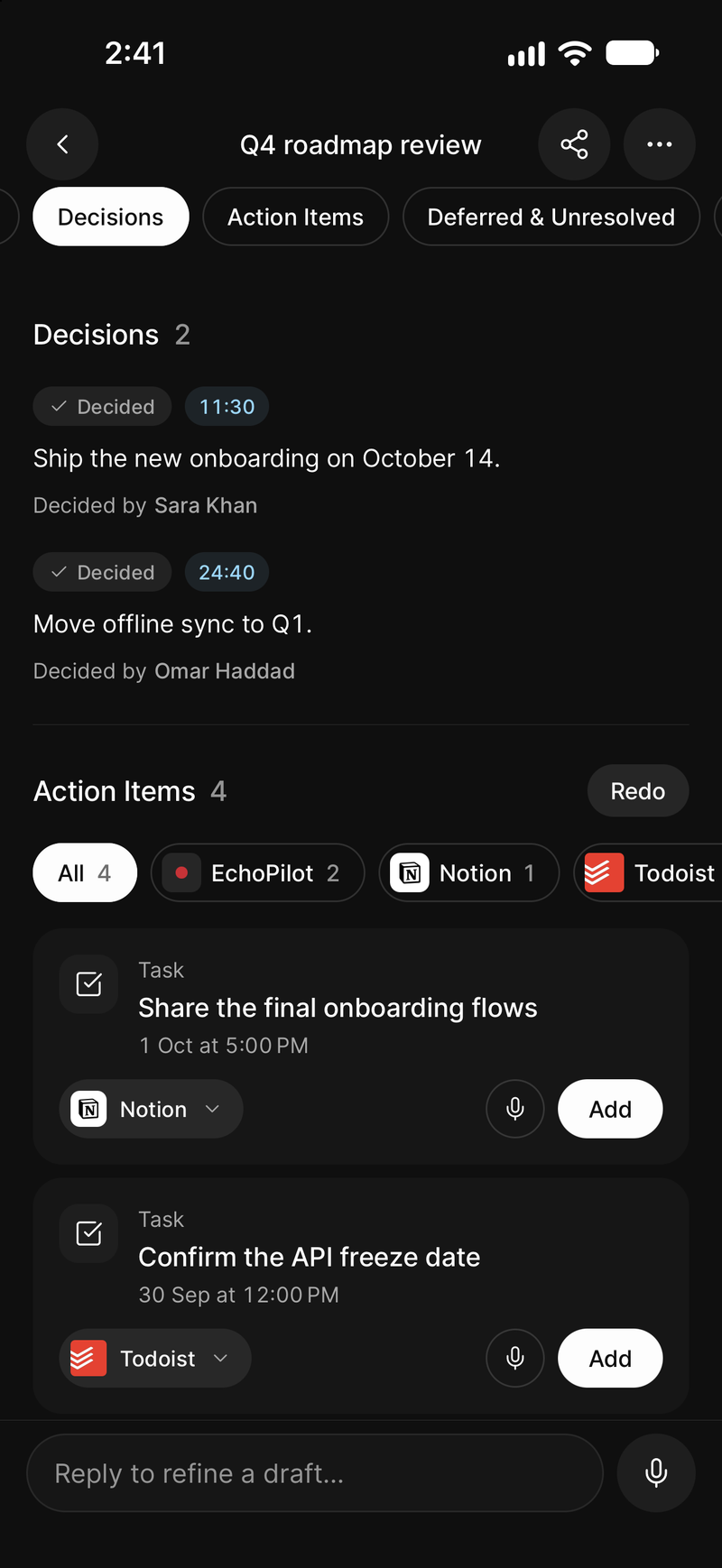
Decisions with their owners, then the action items
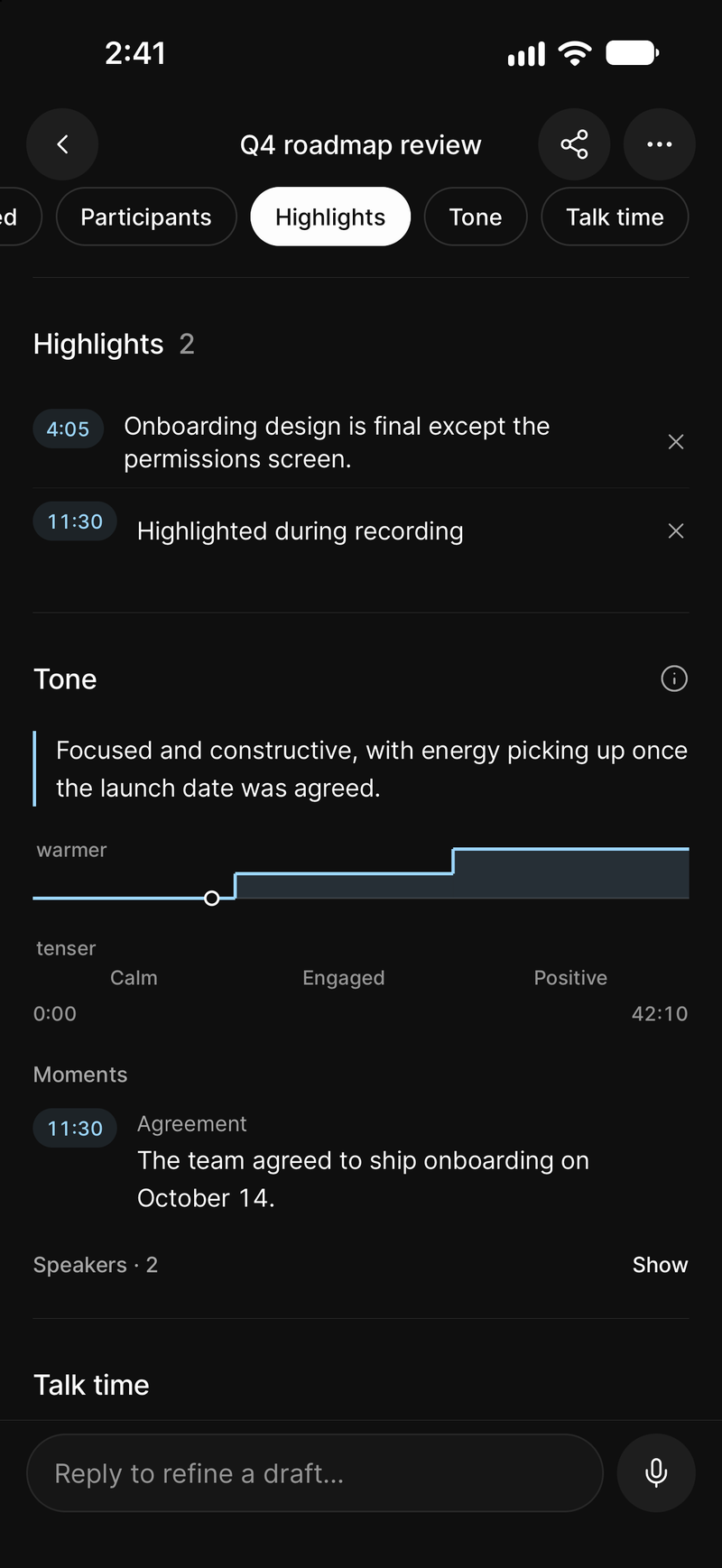
Your highlights and the tone of the meeting
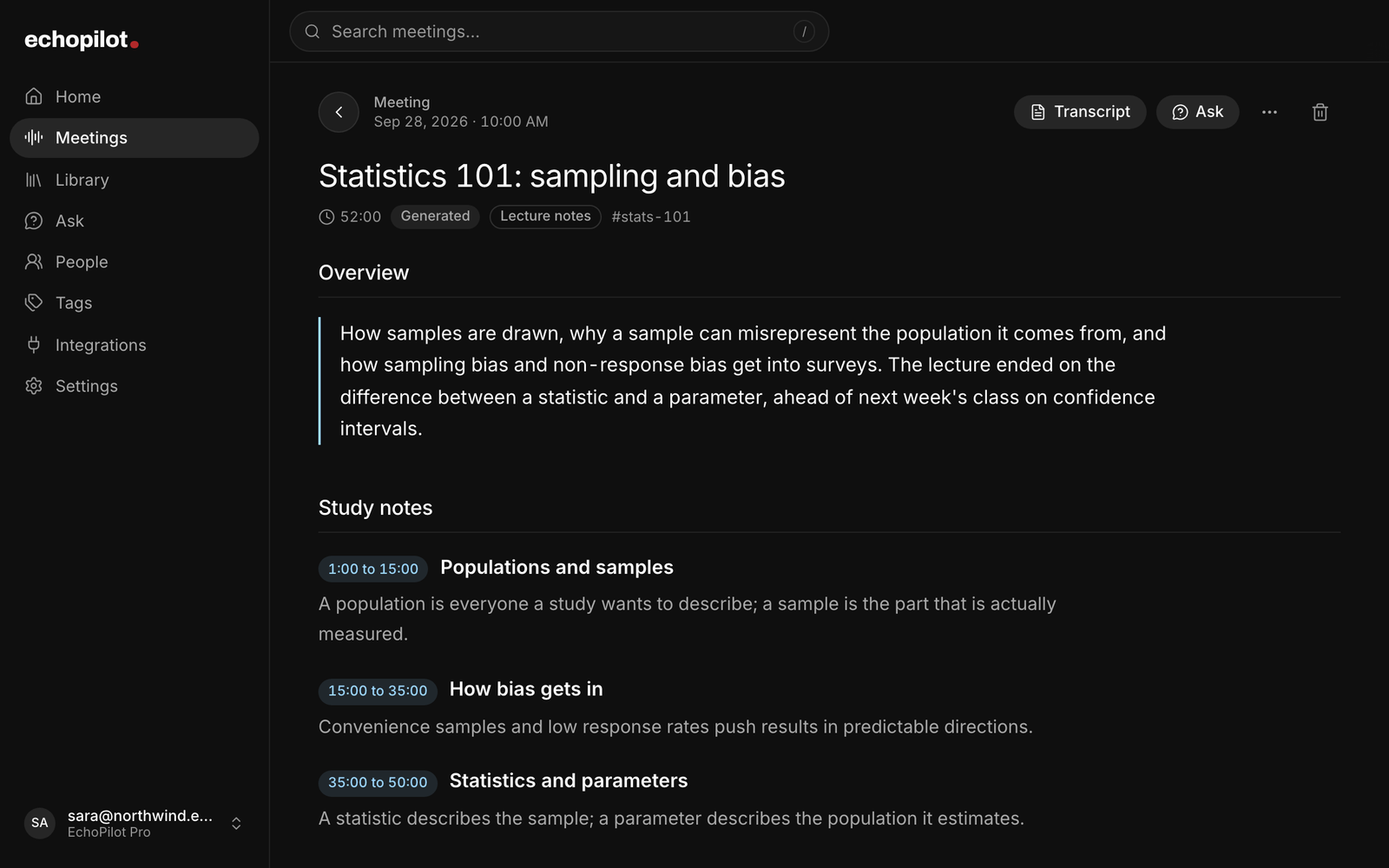
A lecture, written up as lecture notes
Most tools stop at a document. You get a transcript, maybe a summary, and a person still has to read it and work out what to do. EchoPilot writes AI meeting minutes and treats them as the middle of the job: one stage of an AI meeting assistant that starts at the recording and ends at an action you approved. If you are comparing meeting minutes software or a minutes of meeting (MoM) app, this page is what you get from one recording.
A phone on the table records the room. The Mac or Windows app records your microphone and the meeting audio your computer is playing, so remote participants are captured directly rather than through the air, whether the call is in Zoom, Microsoft Teams or Google Meet. An Apple Watch starts a capture from your wrist. No bot joins any of them.
A Pro recording runs up to four hours, with the app in the background and the screen locked. Audio is written to disk in segments as it goes, so a phone call, a flat battery or a crash costs the last few seconds rather than the meeting, and a recording made with no connection uploads itself when you are back online. The meeting recorder page covers each of those failures and what happens instead. A meeting spends meeting minutes and nothing else; it never also uses one of your voice captures.
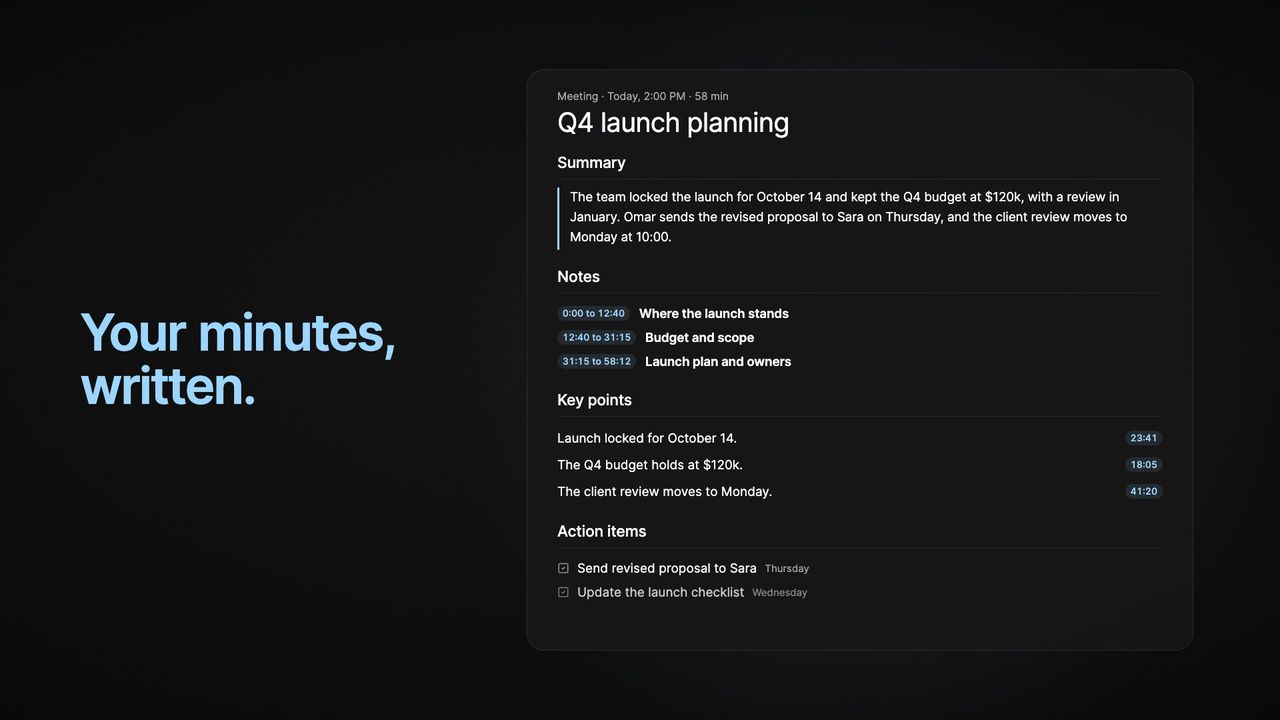
Stop the recording and a structured document comes back, not a wall of text: a title taken from the content rather than the calendar, a meeting summary of what happened and where it landed, timestamped meeting notes in chapters that keep the names, numbers and examples people used, who took part and what they do, key points each backed by the moment in the audio it came from, the decisions that were made (marked apart from things the meeting only confirmed), the questions and risks left open, the action items people actually committed to, your highlights, and the full transcript. The screens on this page are the app itself, showing a sample meeting.
A section with nothing in it says so. A meeting with no decisions shows “None” under Decisions rather than promoting a discussion into one.
Each section loads and recovers on its own. A slow section never hides a finished one, and a section that fails can be retried without rebuilding the rest.
That list is Standard minutes. Not every recording is a meeting, so EchoPilot reads what a recording is about and picks the template that fits: Standard minutes, Lecture notes for a lecture or class, Decisions and actions, Check-in, Brainstorming notes, Interview notes for an interview, Real estate notes for a showing, a client consultation or a negotiation, or Doctor visit notes for a doctor’s appointment. Each one changes the sections to suit the recording: a lecture gets study notes by topic, definitions and questions to review; an interview gets each question with its answer; a brainstorm gets ideas grouped by theme and the directions the group wanted to pursue; a property conversation gets the client’s requirements, the budget, each property with the feedback on it, and the offers; an appointment gets the medicines and how to take them, the tests, the warning signs and the follow-up. When EchoPilot is not confident, it uses Standard minutes, and the result always shows which template it used. That happens on every plan.
If most of your recordings are one kind, choose a default template in Settings, under Meetings, on your phone, on the web or in the desktop app, and every new meeting is written with it, whichever device records it. Your default is never overridden: when a recording is clearly something else, the meeting offers to rebuild it with the template that fits, once, and you can dismiss it.
On Pro, switch a recording to another template, including Executive brief and Detailed notes, which are only ever chosen by hand, and preview the new version before it replaces the one you have.
Every line of the transcript carries a timestamp, and tapping a line plays the recording from that moment. Search it and you get match counts with next and previous stepping. The follow-along highlight tracks the audio closely as it plays; it is a reading aid, not subtitle-grade timing.
On supported Pro meetings, EchoPilot identifies timestamped speaker turns and lets you rename or merge the labels for that meeting. When reliable attribution is not available, it shows the full transcript without names and says so, rather than guessing who spoke.
If a line was misheard, correct it. The original audio and text stay underneath as evidence, and any minutes built from the old wording are marked out of date so you can rebuild them when you choose.
Below the highlights, Tone says how the conversation went: one sentence, a line across the meeting that rises where the discussion warmed and dips where it tightened, and the moments worth hearing again, each opening the transcript at the line it came from. Ask can use it too: “When did the meeting become tense?” answers with those moments and the lines behind them.
It is read from the words in the transcript, not from anyone’s voice, and it describes how the conversation came across, not what anyone felt. Every stretch and every moment points at the transcript lines it was read from, and when there is too little to go on it says so rather than guessing. The reading stays on your own meeting page: it is never shared into a Company workspace and never appears in a notification or an export. Turn Meeting tone off in Settings and the readings are deleted.
A weekly check-in, a client’s calls, a project’s reviews: the meetings of one recurring calendar event form a series by themselves, and any earlier meeting can be linked from a meeting’s menu. The series shows its meetings in order and the tasks still open across them, so a commitment made three meetings ago is still visible, and Ask takes the whole series as its scope. Each meeting keeps its own minutes, transcript and cards; the series is the thread.
A meeting recorded in pieces, because the phone was moved, the call dropped or the room changed, merges back into one. Choose two to six recordings made within seven days and EchoPilot writes one set of minutes for them in order, with one transcript to search and one set of cards to review, while each part keeps its own audio and transcript underneath. Up to 60 minutes in total is on Free, up to four hours on Pro, and a merged meeting can be taken apart again.
You do not reread a four-hour meeting to find one decision. Ask answers questions about a single meeting, a recurring series, or everything you have recorded, and cites the moment it used so you can hear the sentence yourself. It is read-only: it never creates, edits or sends anything.
Every commitment EchoPilot finds becomes an action card with a destination already chosen: a task in Todoist or Google Tasks, a reminder, a calendar event, a page in Notion, a message in Slack, a draft email. You read the card, change the destination if it guessed wrong, and confirm.
Nothing is created, updated or sent outside EchoPilot until you approve that card. There is no setting to turn that off, because the review step is the feature.
Minutes translate on request into 32 languages. English, Arabic, Urdu and Hindi are verified end to end and labelled that way in the app; the rest are offered as best effort, and the app says which is which.
Exporting asks what you want before it builds anything: the transcript on its own, the summary and notes on their own, or the whole meeting. PDF, Markdown or plain text. The PDF is typeset in the language the meeting was in, right to left where the script needs it, with the speakers and timestamps kept.
Everything you record is on every device signed into your account. Capture happens on the phone, the watch or the desktop app; reading, searching, asking and approving happen anywhere, including the web app. Deleting a recording moves it to a bin for 30 days with its audio and cards intact, unreachable from search, Ask and exports while it is there.
Segmented, resumable recording. Audio is written to disk as the meeting runs, so an interruption does not lose it. A whole meeting can be recorded with no connection and uploads itself later.
Speaker attribution. Available on supported Pro meetings. When reliable attribution is unavailable the full transcript is shown without names, and the app says so rather than guessing. Voice Print is not available.
A minutes template chosen for each recording. Switching a meeting to another template and rebuilding its minutes is on Pro.
A template suggested for a meeting that looks like another kind. Offered once per meeting and never applied by itself; rebuilding under the suggested template is on Pro.
Meeting tone. Read from the words in the transcript, never from anyone's voice, and it describes the conversation rather than how anyone felt.
Meetings that belong together, as a series. A series forms from the meetings of one recurring calendar event, or by hand: from a meeting's menu, or with Add meetings on the series. What a series will remember before the next meeting is in development.
Merge a meeting recorded in pieces. Two to six meetings recorded within seven days, up to 60 minutes in total on Free and four hours on Pro. Each part keeps its own audio and transcript.
Minutes translation. 32 languages, of which English, Arabic, Urdu and Hindi are verified end to end. The rest are offered as best effort and the app labels them that way.
Install EchoPilot on the phone or the computer you already work on, record the next conversation you would otherwise try to remember, and read the minutes, the transcript and the drafted actions it gives you back.
Questions? support@echopilotapp.com