Remember what your doctor said. Play back the exact words.
Record the appointment on your phone, or a video visit on your computer. EchoPilot writes Doctor visit notes with the medicines and how to take them, the tests, the plan, what to avoid, when to get help and what happens next, each one tied to the moment it was said.
- Recorded on your phone, even offline
- Every note tied to the moment it was said
- Yours alone unless you share it
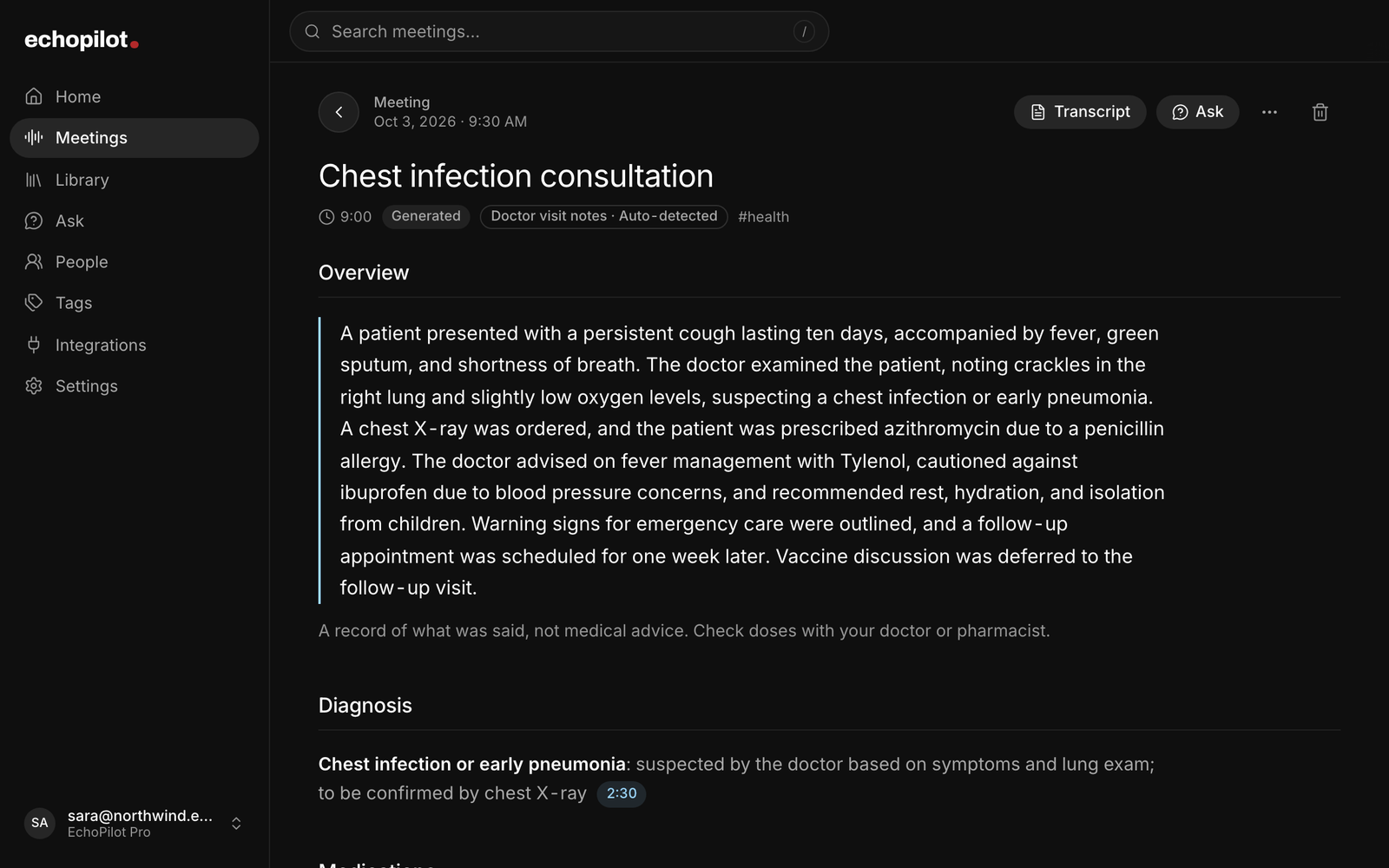
In the room or on a video visit
Your phone records the appointment, signal or not. The Mac or Windows app records a video visit from the computer’s own audio, with nothing joining the call.
Notes in a patient’s terms
What the doctor found, the medicines and how to take them, the tests, the plan, what to avoid, when to get help and the follow-up, written by the Doctor visit notes template.
Ask what the doctor said
What did she prescribe? When is my follow-up? Answers come from the appointment, cite the moment, and say plainly when something was not discussed.
Follow-ups, ready to approve
The follow-up appointment, the blood test to book and the referral to chase come back as cards you approve into your calendar or your task app.
What it looks like
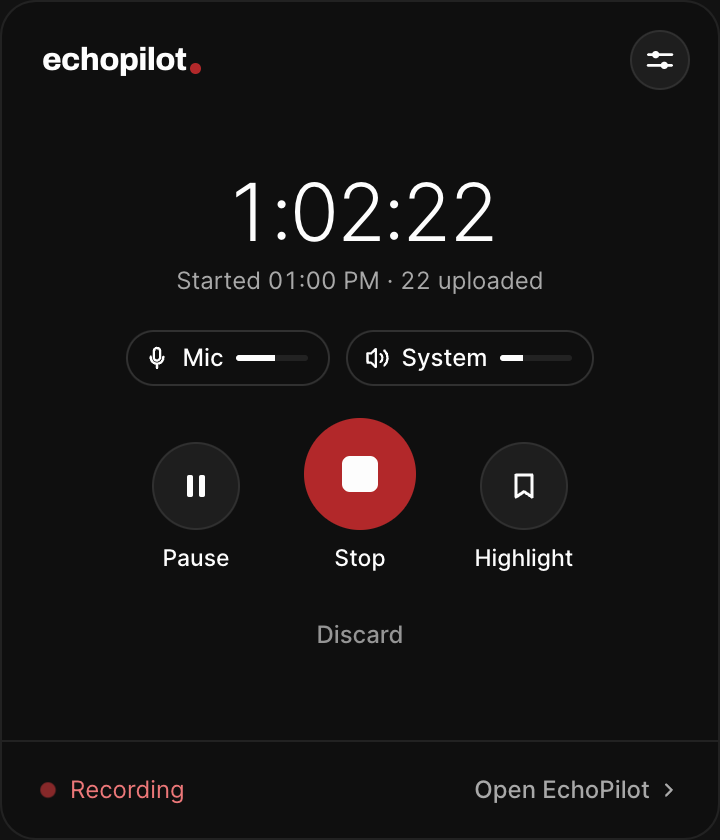
A video visit, recorded on your computer
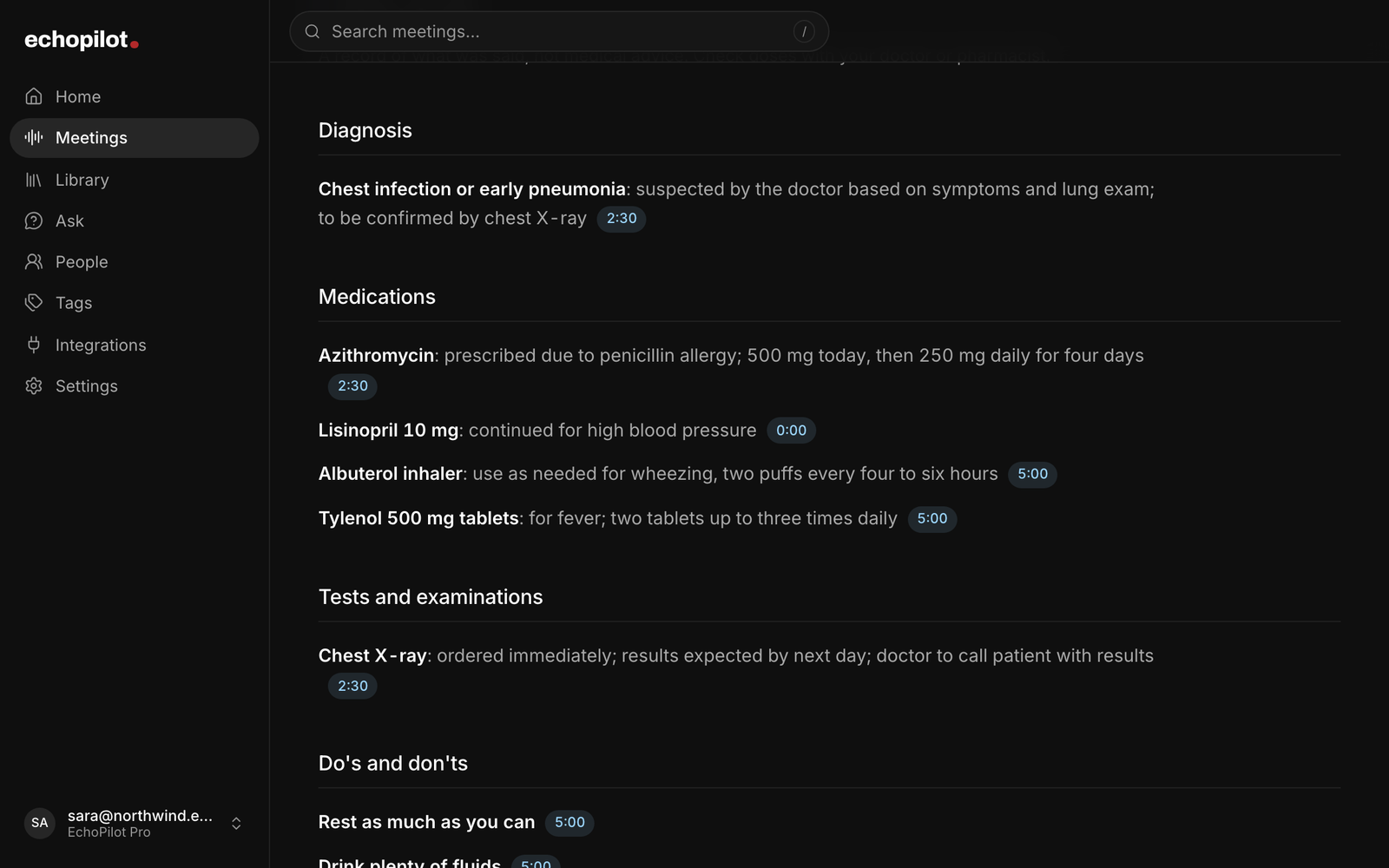
The diagnosis as the doctor put it, and every dose as it was said
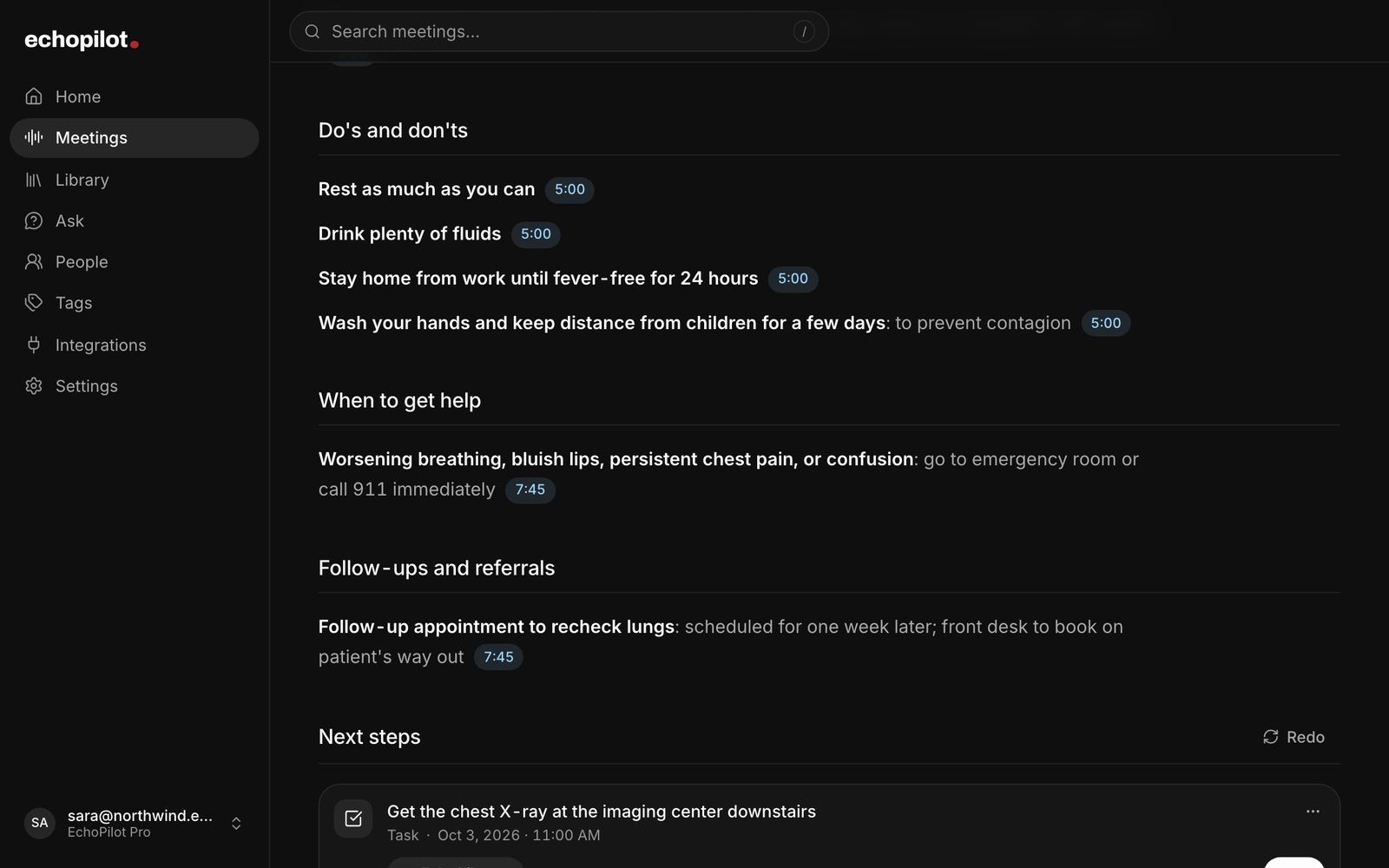
What to avoid, when to get help, and what happens next
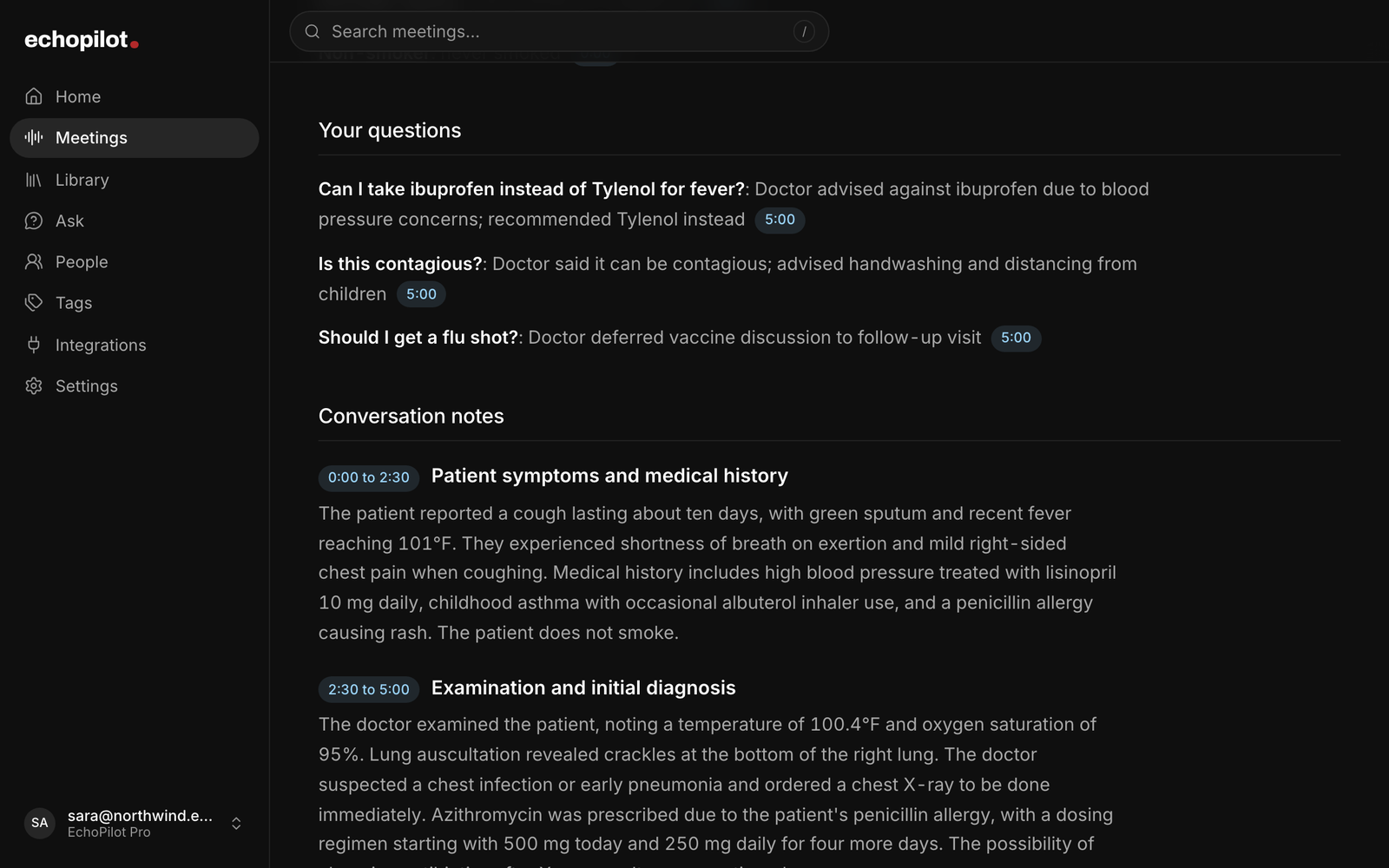
Your questions, the answers, and what is still open
For doctor appointments, in depth.
Appointments are short, and the most important part comes at the end, when the doctor runs through the new medicine, how to take it, what to watch for and when to come back. By the time you reach the pharmacy, half of it has blurred. Record the appointment instead. EchoPilot writes it up as Doctor visit notes: what the doctor found, the medicines and how to take each one, the tests, the plan, what to avoid, when to get help and what happens next, each note tied to the moment it was said, so you can play the exact words before you rely on them.
Record the appointment, in the room or on a video call
At the clinic, open EchoPilot on your phone, press record and put the phone on the desk between you and the doctor. It keeps recording with the screen locked, and a recording made with no signal stays on the phone and uploads itself once you are back online. It is the same recorder as for any in-person meeting, so it suits a hospital consultation, a specialist review or a family member’s appointment you go along to.
When the appointment is a video visit, the Mac and Windows app records the audio your computer is playing along with your microphone. Nothing joins the call, so the doctor sees no bot and no extra participant. Tell them you are recording all the same. On Mac, capturing the computer’s audio needs macOS 14.2 or later. The web app is where you read and search on a laptop; it does not record.
Doctor visit notes, written for the patient
A medical appointment comes back in the shape a patient needs, with each section shown only when the appointment reached it:
- Overview: why you went, what the doctor found, the plan and what happens next.
- Diagnosis: only what the doctor said it is, might be, or is not, with their certainty kept: a possible diagnosis stays possible.
- Medications: every medicine discussed, with the dose, how often, for how long and how to take it, and whether it is new, changed, stopped or one you already take.
- Treatment plan, tests and examinations: therapy, procedures and monitoring, and every test done or ordered, with results as they were read out.
- Do’s and don’ts: what to do and what to avoid, from diet and alcohol to exercise, work and driving.
- When to get help: the warning signs the doctor gave, and what to do if one appears.
- Follow-ups and referrals, and next steps: the next appointment, the referral, when results come, and what you or the clinic said you would do.
- Symptoms and history: what you told the doctor, kept apart from what the doctor concluded.
- Your questions, with the answers, and anything unclear or unanswered.
Underneath sits the full transcript and the conversation notes, topic by topic. Doctor visit notes are written for a recording made on any device, and open in full on the web and in the Mac and Windows app.
Every note points back to the recording
A note is only useful if you can trust it, so each one carries the moment it was said: tap it and the transcript opens there, ready to play. The notes are written to keep medicine names as the doctor said them and doses, units, readings and dates as they were spoken, and every medicine name is then checked against the recording, as is every dose in an English recording. A name or a dose that was not said as written is marked unclear and listed, so you know to check it against your prescription. A check can miss things, so treat the notes as a reminder of what was said, not a replacement for the prescription. A section the appointment never reached stays empty.
The notes are a record of the conversation, not medical advice, and every copy says so. Check each medicine and dose against your prescription or the pharmacy label, and ask your doctor or pharmacist about anything that does not match.
One example, start to finish
The screens on this page show a sample visit for a cough and a fever. The doctor heard crackles in one lung, said it could be an early pneumonia and ordered an X-ray to be sure; the notes keep it as possible. The patient is allergic to penicillin, so the doctor chose azithromycin, and the notes give both doses and the number of days as they were said. The patient asked about ibuprofen and was told to stay with Tylenol; that answer is under Your questions, and ibuprofen gets no dose. The warning signs, the week until the follow-up and the X-ray result call are each in their own place, and the question about a flu shot says it was left for the follow-up.
Ask about the appointment afterwards
A week later, Ask can answer what you have forgotten: what medicine she prescribed, what you should avoid, when the follow-up is, which tests were ordered, which symptoms you mentioned. Answers come from the appointment and cite the moment, so you can play the sentence. When the appointment did not cover something, Ask says so and suggests asking your doctor or pharmacist; it does not fill the gap with a dose or a diagnosis of its own. It can explain in plain words what a term the doctor used generally means, and it says when it is doing that.
Appointments in another language
The transcript stays in the language that was spoken, and the notes are written in the language of the appointment, with medicine names kept as the doctor said them. On Pro, the notes can be translated beside the original into the language you read best, and the original is one tap away. Medicine names are kept as they were said, so an appointment in Arabic with the medicines named in English is written in Arabic with the English names left as spoken.
Make Doctor visit notes your default
Without any setting, EchoPilot recognizes a medical appointment by itself and uses Doctor visit notes when it is sure, and each recording shows which template wrote it. If you record many appointments, for yourself or someone you care for, choose Doctor visit notes as your default template in Settings, on the web or in the Mac and Windows app. Every recording from then on is written with it, whichever device recorded it. Your default is never changed for you: when a recording is clearly something else, a work meeting for instance, it offers once to rebuild it with the template that fits. Rebuilding never records or transcribes anything again, and the previous notes stay in the version history.
Private by default
A recording is yours. If your account belongs to a company workspace, a recording EchoPilot recognizes as a doctor visit, from its notes, from the recording itself or because Doctor visit notes is your default, is never shared with it automatically, even when Auto share is on or the company asks members to share their meetings, and a recording too short for notes is never shared automatically either. Recognition can miss, so if you record appointments on a work account, choose Doctor visit notes as your default or leave Auto share off. A doctor visit reaches the workspace if you share it yourself, and the share screen says it is a doctor visit before you confirm. Exports as a PDF, Markdown or plain text are files you choose to send, to a family member or to your next doctor, and they carry the same line saying the notes are a record, not advice. Delete a recording and it goes to the bin, where it can be restored until it is removed for good.
Ask before you record
Recording rules differ by country and by state, and some places require everyone in the conversation to agree. Ask your doctor at the start, say it is so you can remember what was said, and keep the recording for your own care. The recording consent guide covers the general rules; it is not legal advice.
What EchoPilot does not do
EchoPilot does not give medical advice, diagnose, or check whether a doctor’s advice is right: it records and organizes what was said. It is built for patients and families, not as a clinician’s documentation tool, and it does not connect to patient portals or health records. It does not record phone calls; it records the room on your phone and video calls on your computer. It does not import audio files. And nothing joins a call as a bot.
Free and Pro
Free is a permanent plan with real meeting minutes each month, enough to try Doctor visit notes on your next appointment; Pro adds more minutes, longer recordings, switching a recording to another template, translation and speaker turns. The pricing page has every number, read from the product, and the app is on the download page for iPhone, Android, Mac and Windows.
Questions worth answering.
Can I record my doctor's appointment?
Does EchoPilot give medical advice?
Who can see my doctor visit notes?
Can every recording come back as Doctor visit notes?
What happens if I lose signal during a meeting?
What do I get on Free, and what does Pro add?
Your next meeting can end with the work already drafted.
Install EchoPilot on the phone or the computer you already work on, record the next conversation you would otherwise try to remember, and read the minutes, the transcript and the drafted actions it gives you back.
Questions? support@echopilotapp.com