One recording.
The whole meeting, handled.
EchoPilot records the meeting on the device already in front of you, writes the Meeting Minutes, answers questions with the moment cited, and turns every commitment into an action you approve. Then all of it is on every device you use.
- No bot in the call
- Minutes, answers, actions
- One account, every device
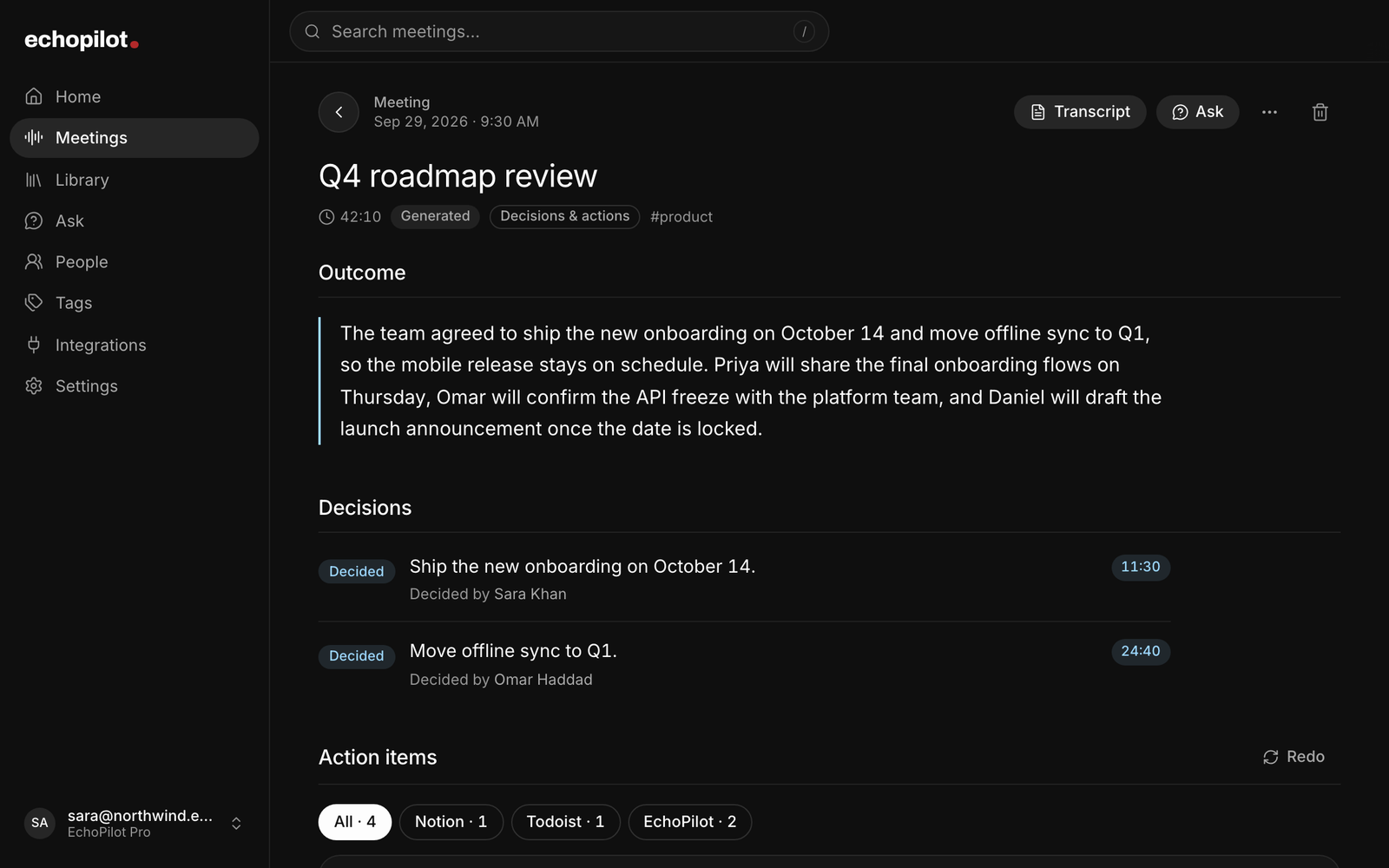
What a meeting turns into.
Stop the recording and this is what is waiting: a written record you can read in two minutes, and the work that came out of it.
One recording comes back as seven things, not one document.
-
A title from the content
Named for what was discussed, not the date.
-
A summary
What happened and what was decided, in a paragraph.
-
Timestamped notes
The meeting in chapters, readable in order.
-
Key points
Each carries its moment. Tap it and hear the sentence.
-
Action items
The commitments people made, drafted as cards with a destination chosen.
-
Your highlights
Anything you marked while it was being said.
-
The full transcript
Searchable, synced to the audio from any line.
The board reviewed Q3 against plan. Enterprise renewals carried the quarter while self-serve missed forecast. The team agreed to hold current pricing and revisit packaging in Q4.
See how a card becomes a task →
Every line knows
where it came from.
Search the transcript, step through the matches, and tap any line to hear that exact moment. The highlight follows the audio as it plays, so reading and listening stay together. The demo below is real: press play.
20:48So if we move the tier now, we reopen every renewal conversation we just closed. I'd rather hold.
21:14Agreed. We hold pricing. Packaging is the lever. Let's bring three packaging options back to the board.
22:02That works. I'll own the options doc and circulate it Monday, before the board sees it.
[ audio unavailable 24:10 – 26:40 ]
26:40Back to the hiring plan. Two engineering roles are still open against the old forecast.
Skipped 2m 30s of unavailable audio
Interactive demo A sample meeting with synthesized voices. Playback, search, and seeking are real.
Records where the meeting is
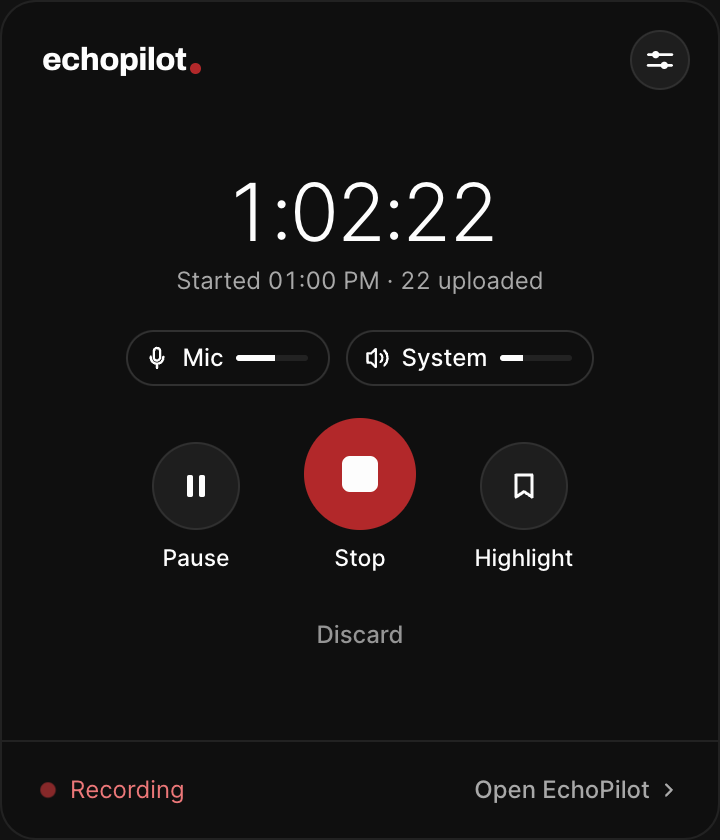
A phone in the room, a Mac or PC on the call, a watch on your wrist. Nothing joins the meeting.
Writes the minutes, not a transcript dump
Title, summary, chaptered notes, key points, decisions, open questions and action items, each tied to the moment it was said.
Answers with the evidence
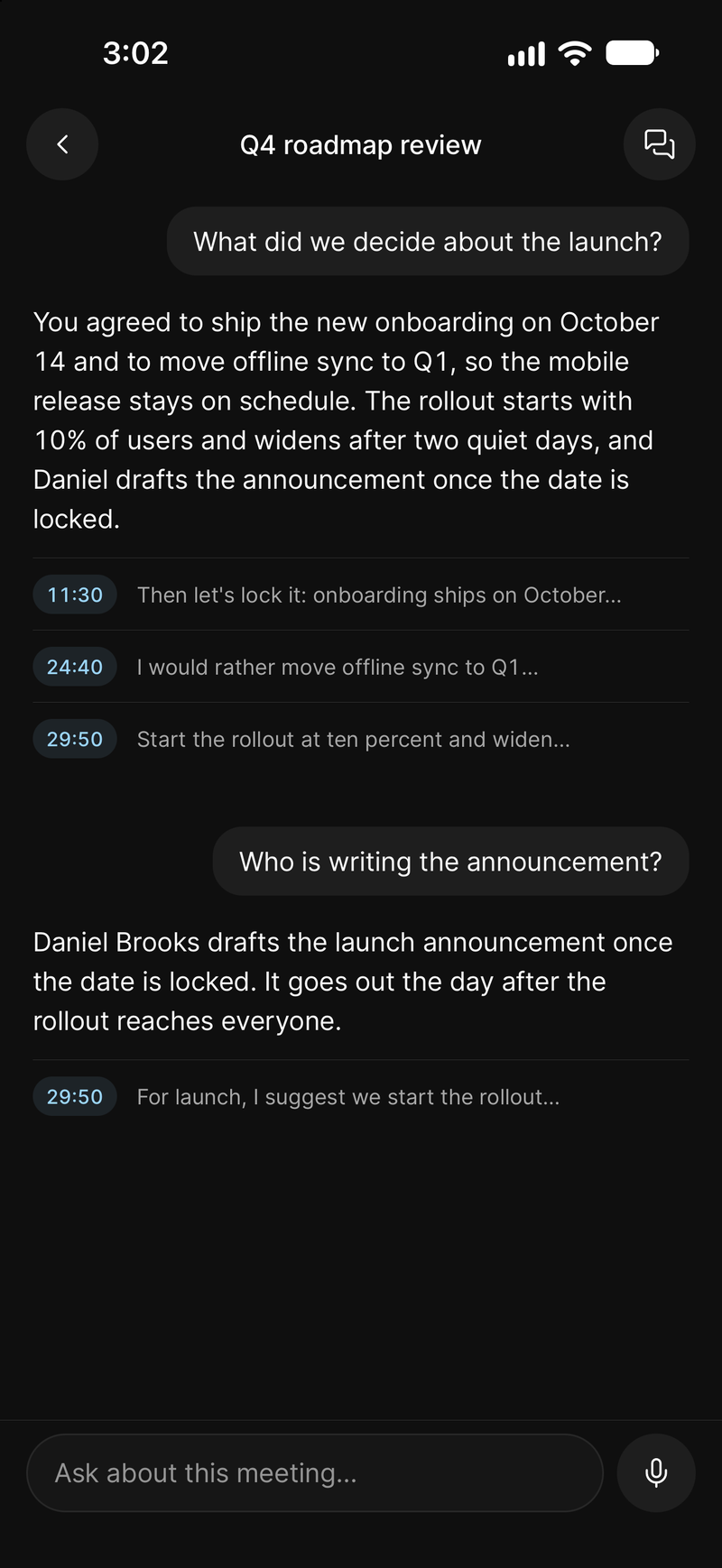
Ask one meeting, a series or everything. Every answer cites the moment, and one tap plays it.
Turns commitments into work you approve
One card per commitment, destination chosen, nothing sent anywhere until you confirm.
What it looks like
-
Recording a call on a Mac or Windows PC
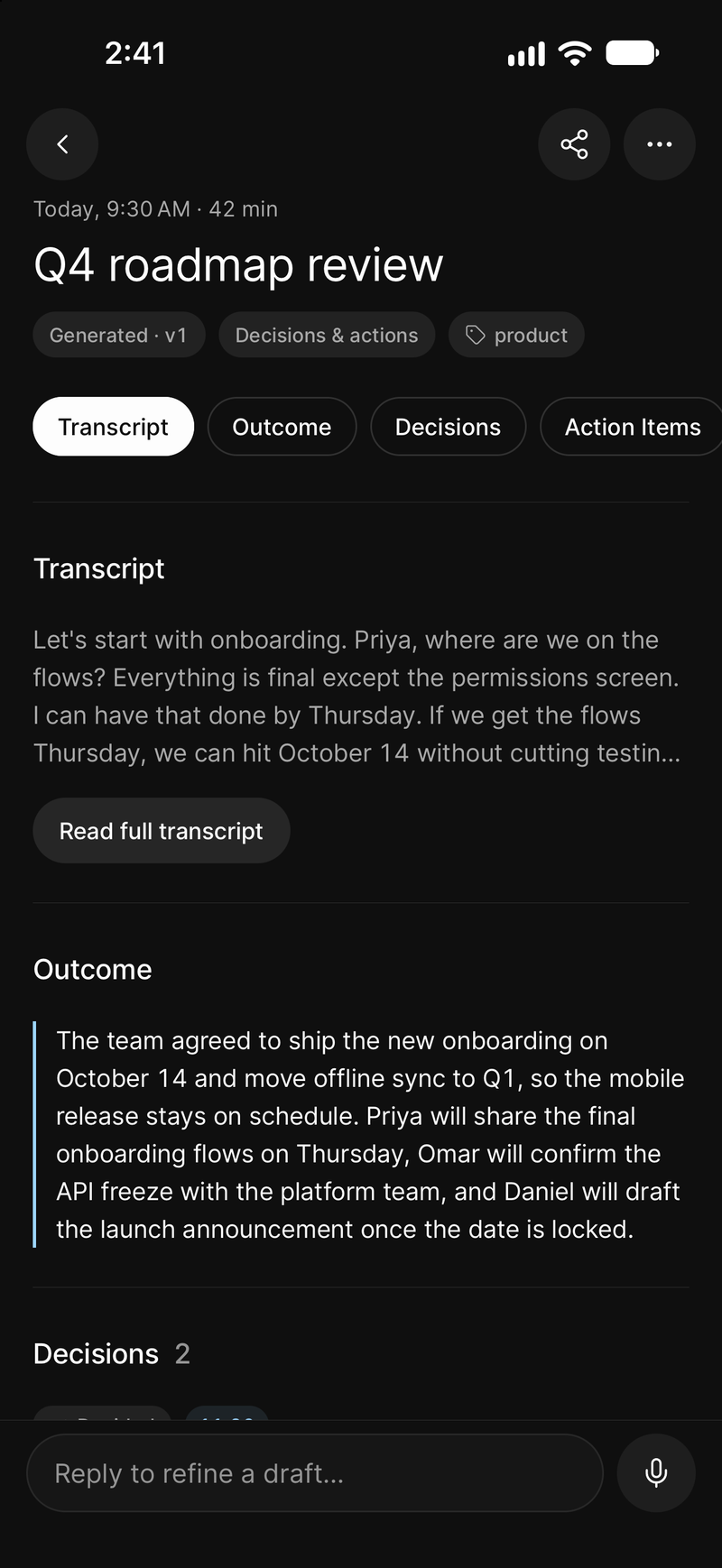
The minutes, on your phone
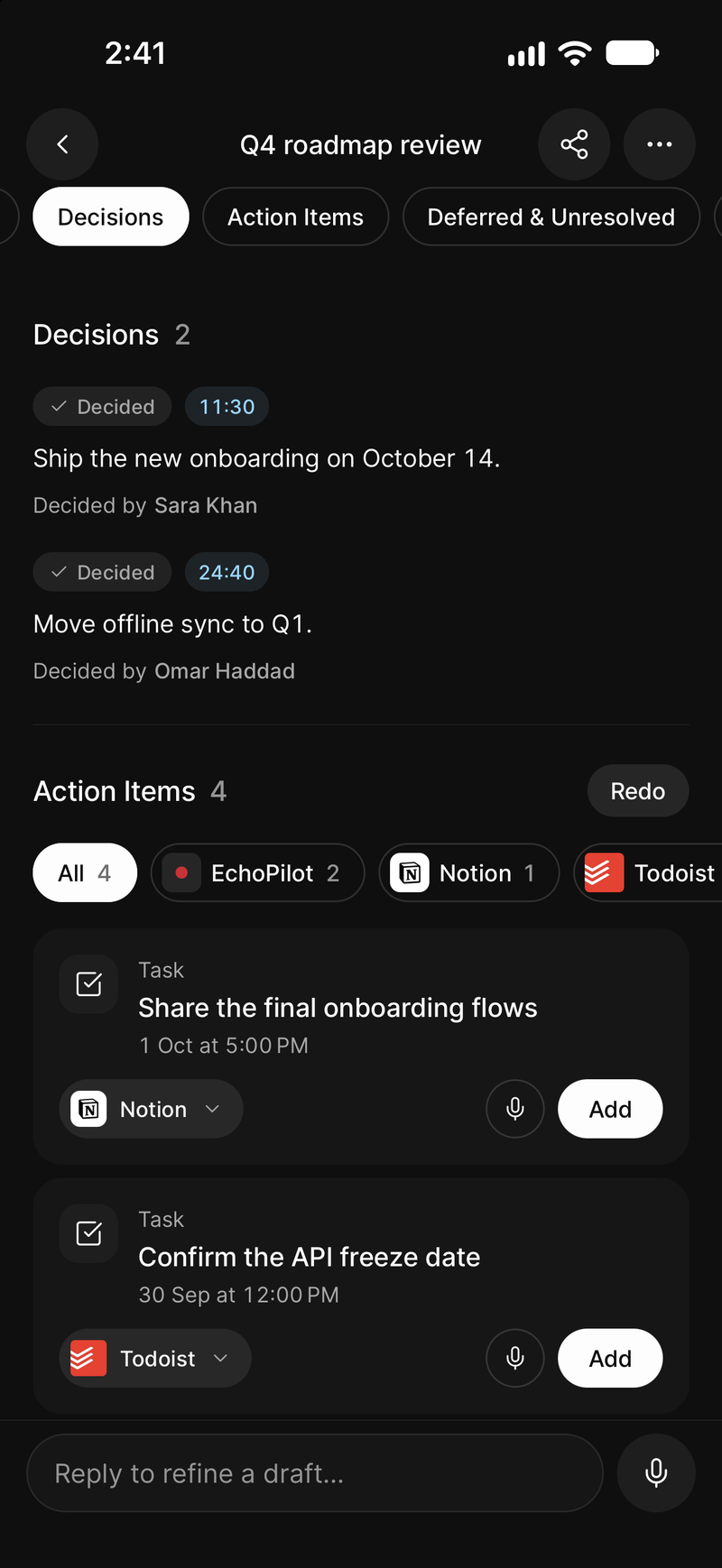
One card per commitment, waiting for approval
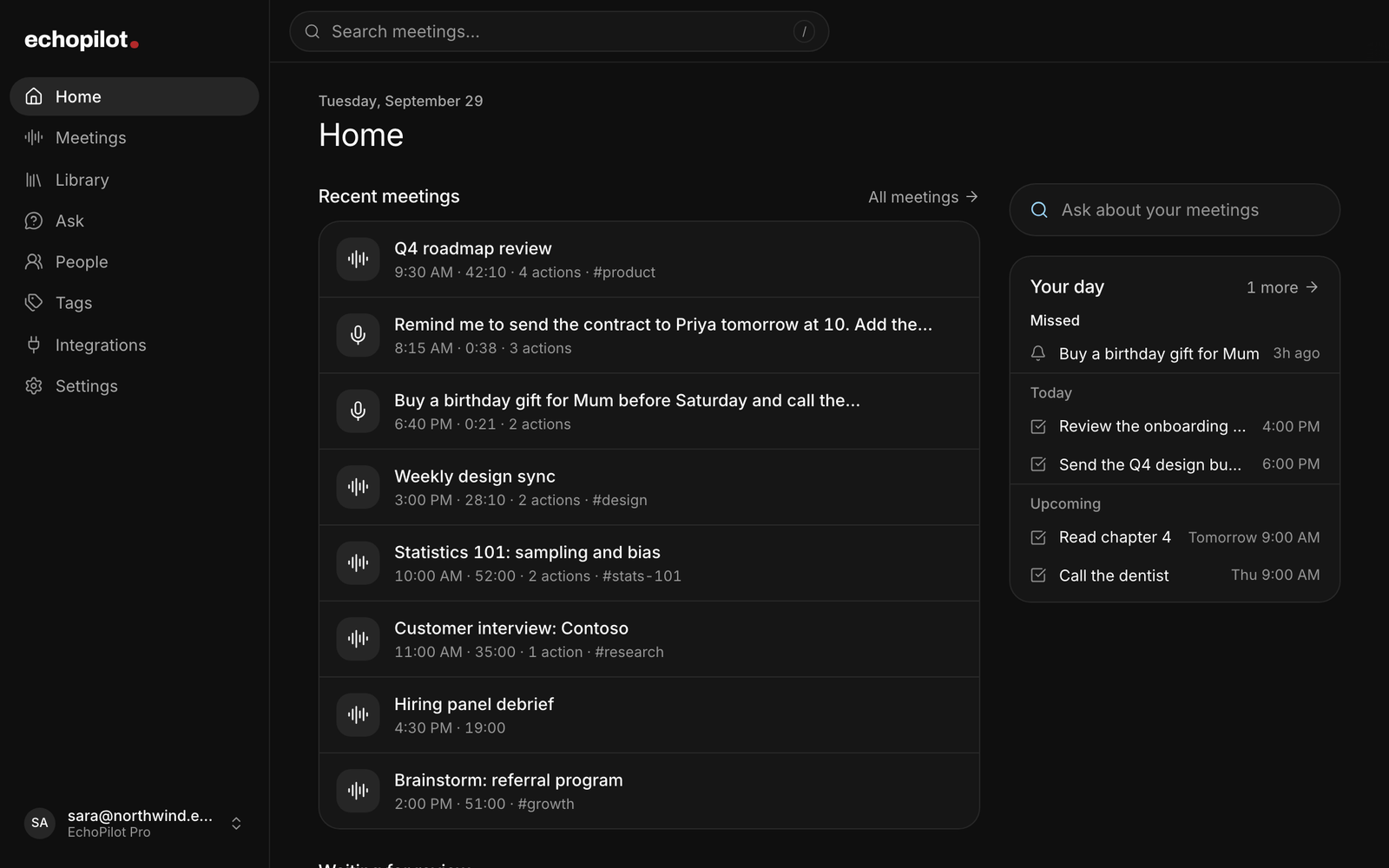
Every meeting and task, in the web app
AI meeting assistant, in depth.
“AI meeting assistant” has come to mean a bot that joins your video call and emails a transcript afterwards. That is one narrow shape of the idea, and it leaves out the meeting in the room, the conversation in the corridor, and everything that happens after the transcript arrives. EchoPilot is built around the whole job: record the meeting, get the Meeting Minutes, ask it questions, turn the discussion into actions, and have all of it on your phone, your computer and the web.
What an AI meeting assistant should do
Four things, in order. Record the meeting without getting in its way. Write minutes a person would actually use, not a wall of text with a summary on top. Answer questions about what was said, with evidence. Turn the commitments into work, without doing anything behind your back. Most tools do one or two of these well and stop. EchoPilot does all four from one recording, and each has its own page: the meeting recorder, the Meeting Minutes, Ask, and meeting actions.
Record on the device you already have
A phone on the table records the room, in the background, with the screen locked. The Mac and Windows app records your microphone and the meeting audio your computer is playing, so the other side of a video call is captured at source, and nothing joins the call: there is no bot to invite, whether the call is in Zoom, Microsoft Teams, Google Meet or anything else. An Apple Watch starts a capture from your wrist for the conversation you would not have got your phone out for. The meeting in a room, the client meeting and the interview each have a page of their own, with the rest of the use cases.
A recording runs up to four hours, written to disk in segments as it goes, so a call, a crash or a flat battery costs seconds rather than the meeting. A whole meeting can be recorded with no connection and uploads itself later. And there is nothing to buy: the phone and the computer you own are the recorder, which is the difference between EchoPilot and a hardware recorder.
Meeting Minutes, not a transcript dump
Press stop and a structured document comes back: a title taken from what was discussed rather than from the calendar, a summary of what happened and what was decided, timestamped notes in chapters, key points each anchored to the moment in the audio it came from, the decisions made and the questions left open, the action items people committed to, your highlights, and the full transcript. The format fits the recording: a lecture comes back as lecture notes with definitions and deadlines, an interview as each question with its answer, a check-in with its blockers. Each section is built and recovered on its own, so a slow one never hides a finished one. The Meeting Minutes page shows a real set.
Minutes translate on request into 32 languages. English, Arabic, Urdu and Hindi are verified end to end and labelled that way in the app; the rest are offered as best effort, and the app says which is which. Exports ask what you want first: the transcript, the summary and notes, or the whole meeting, as PDF, Markdown or plain text.
A transcript you can check
Every line of the transcript carries a timestamp, and tapping it plays the recording from that moment, so every claim in the minutes can be heard rather than trusted. Search it with match counts and stepping. On supported Pro meetings EchoPilot identifies timestamped speaker turns you can rename or merge; when reliable attribution is not available it shows the transcript without names and says so, rather than guessing who spoke. Correct a misheard line and the original audio and text stay underneath as evidence, with any minutes built on the old wording marked for rebuild.
Ask the meeting
You do not reread a four-hour meeting to find one decision. Ask answers questions about one meeting, a recurring series, or everything you have recorded: what was decided, who committed to what, what figure was quoted, whether an objection has come up before. Every claim about what was said cites the moment it came from, and one tap plays it. Ask keeps three kinds of statement apart: what the recording says, what it implies, and general knowledge, which is never dressed up as something the meeting said. It is read-only. It cannot create, edit or send anything.
Actions you approve
Every commitment in the meeting becomes one action card: what was agreed, written as a task rather than a quotation; the destination it picked, named; the owner and due date when they were actually said; and the moment it came from. You read it, change the destination if the guess was wrong, and confirm. Nothing is created, updated or sent outside EchoPilot until you do, and there is no setting to turn that off.
Approved cards reach the tools you already use: Todoist, Google Tasks, Microsoft To Do, Apple Reminders, Notion, Slack, your calendars, Drive, OneDrive, Teams, Mail and more, eighteen destinations in all, every one opt-in. Some commitments are moments rather than tasks, and those become alarm-style reminders that hold the screen instead of waiting in a notification list.
Everywhere you work
Capture happens on the phone, the watch and the desktop app. Reading, searching, asking, approving and exporting happen anywhere, including the web app, which reviews and never records. One account covers every device, and one subscription covers one person on all of them, with no seats. Get EchoPilot for iPhone, Android, Mac, Windows and the web.
Where it sits among the alternatives
Bot-based tools transcribe the calls they were invited to. AI notepads write the notes and let the audio go. Hardware recorders capture the room and charge for the device. EchoPilot records in the room and on the call, on hardware you own, keeps the audio behind every point, and finishes at an approved action rather than a document. The comparison pages set it against Otter.ai, Fireflies, Granola and Pocket, row by row.
What it costs
Free is a real plan: meeting minutes every month, the complete minutes document, the searchable transcript, action cards and every integration. Pro adds volume, longer meetings, speaker turns, translation, rebuilds and longer retention. Every limit, read from the product itself, is on the pricing page.
What this does not claim
Ask EchoPilot. Read-only. Ask never creates, edits or sends anything.
Reviewable action cards. Nothing is created outside EchoPilot until the card is approved.
Desktop capture of microphone and meeting audio. On Mac, meeting audio needs macOS 14.2 or later. Below that the app records the microphone only and says so.
Signed-in web app. The web app reviews and never records. Capture happens on phone, watch and desktop.
Guides
Questions worth answering.
What is EchoPilot?
Does a bot join my meeting?
Does EchoPilot create tasks automatically?
Does one subscription cover every device?
How is my data handled?
Your next meeting can end with the work already drafted.
Install EchoPilot on the phone or the computer you already work on, record the next conversation you would otherwise try to remember, and read the minutes, the transcript and the drafted actions it gives you back.
Questions? support@echopilotapp.com