Record the call on the computer you take it on.
EchoPilot for Mac and Windows captures your microphone and the meeting audio your computer is playing, so the other people on the call are in the recording. Nothing joins the meeting.
- Microphone and meeting audio
- No bot in the call
- Lives in the menu bar or tray
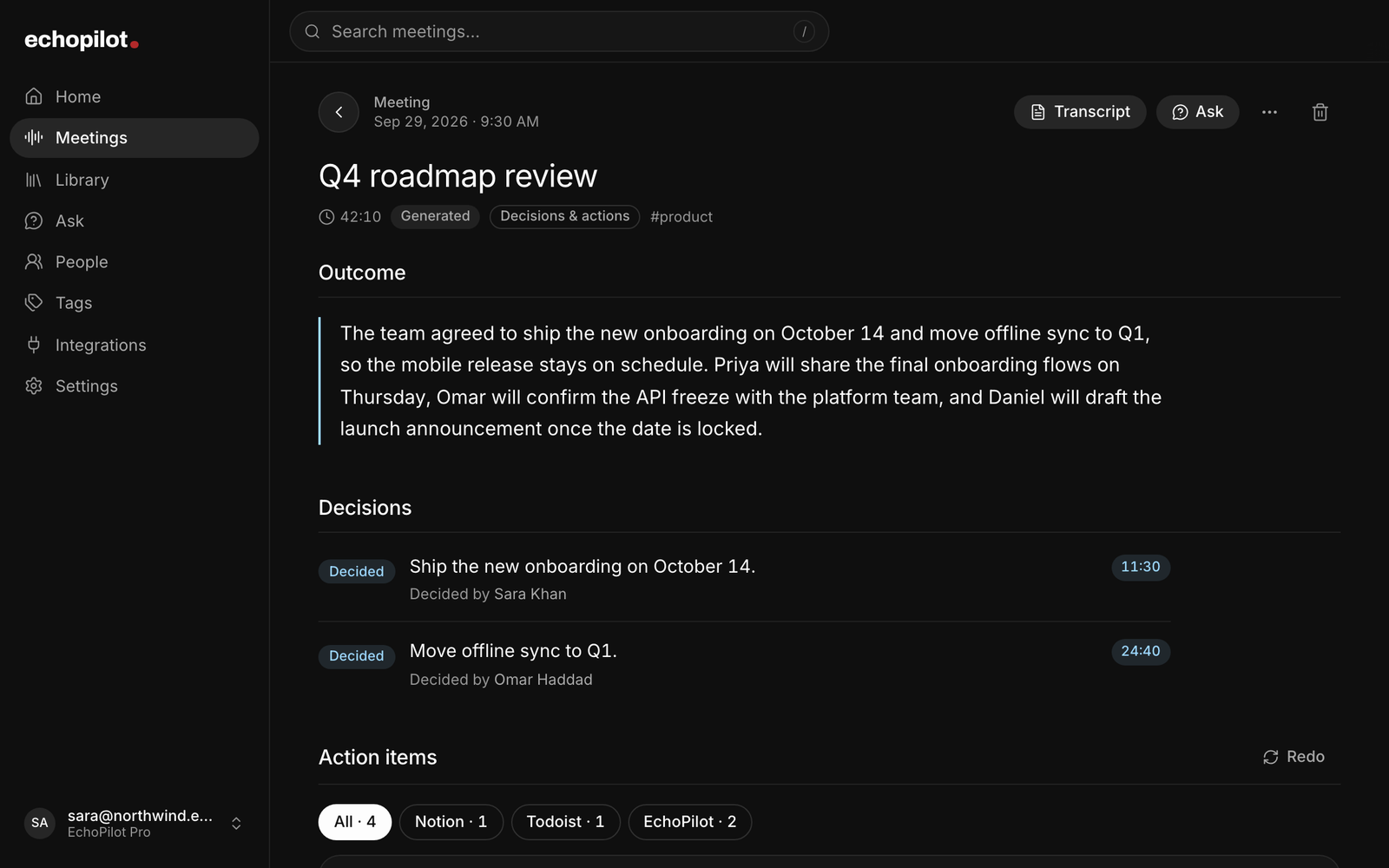
Both sides of the call
Your microphone and the audio your computer plays, so remote participants are captured at source. Mute either one, before or during the meeting.
Nothing joins the meeting
No bot to invite and no extra device to buy. It records any call your computer can hear.
Out of the way
The menu bar on Mac, the system tray on Windows. No window needed to keep recording.
Then it is on your phone
The minutes, transcript and cards appear on every device signed into your account.
What it looks like
-
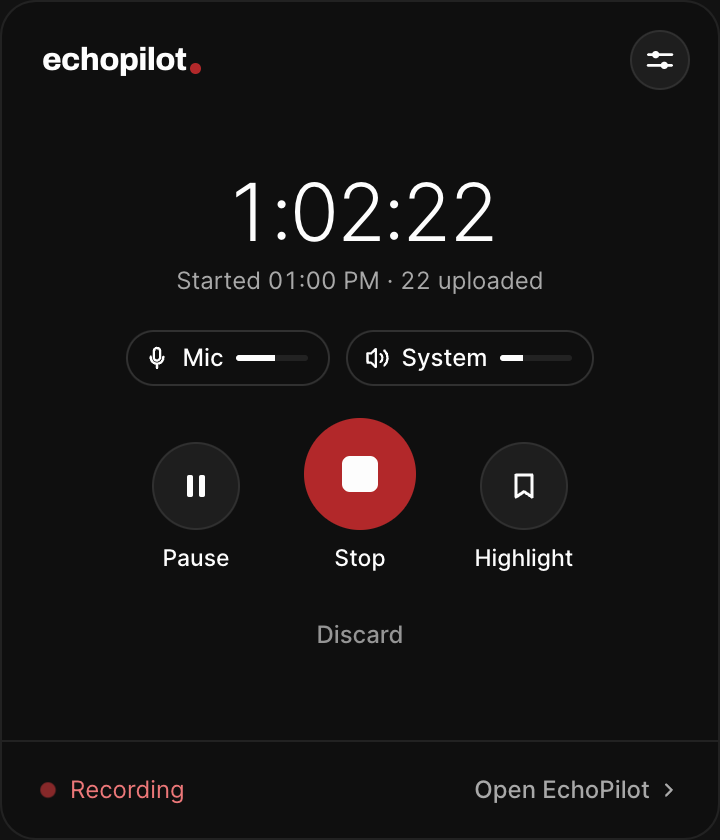
The panel, mid-recording: mic and system audio, each with its own mute
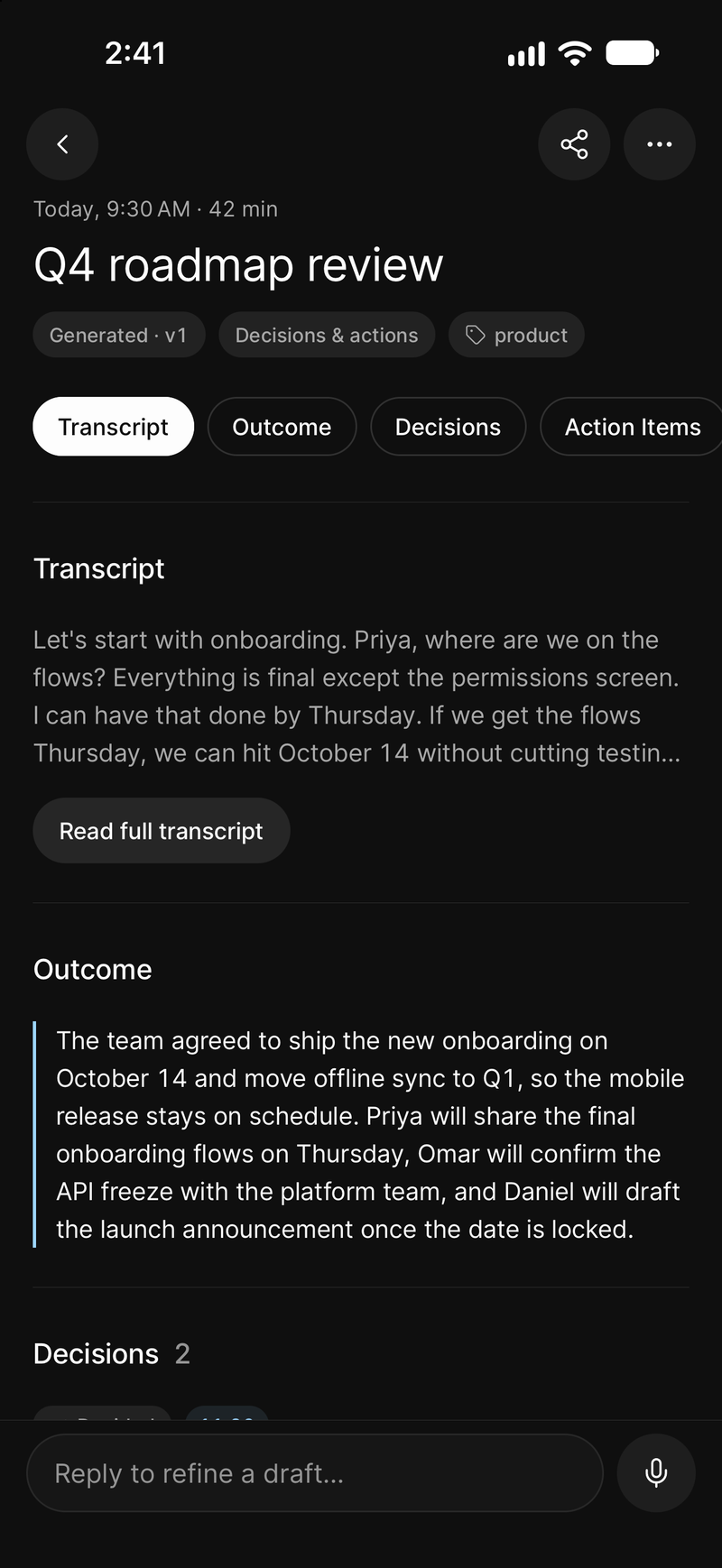
The minutes, on your phone when you stop
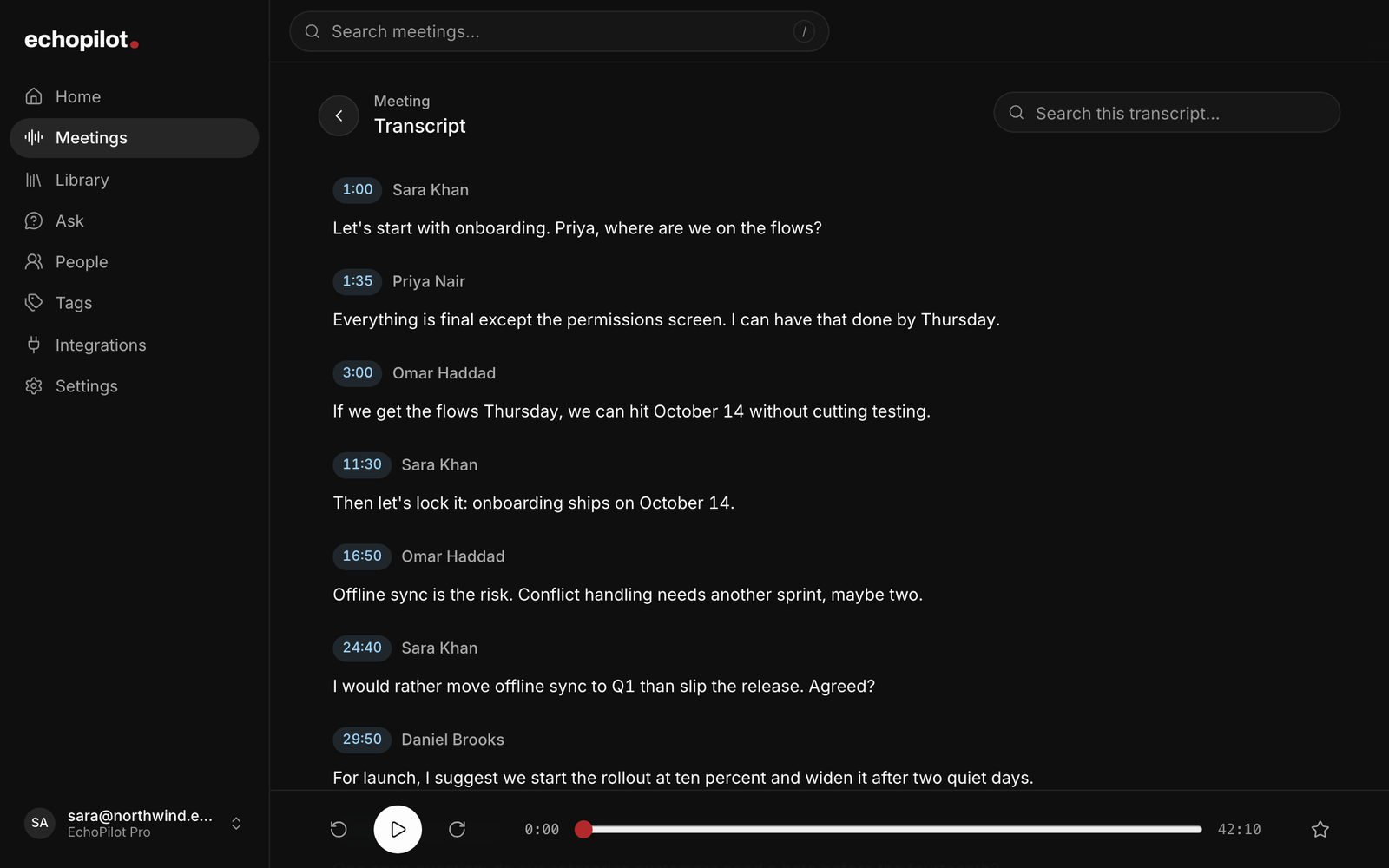
And the whole call, word for word, on the web
Desktop, in depth.
A phone on the desk is a fine way to record a room. It is a poor way to record a video call, because it hears the other participants through a laptop speaker. The desktop app exists to fix exactly that: it is the part of the AI meeting assistant that lives on the computer you take calls on, an AI note taker that records without sending a bot into the meeting.
It works with any app your computer plays a call through. There are step-by-step pages for recording Zoom meetings, recording Microsoft Teams meetings and recording Google Meet calls.
What it captures
Two streams, together: your microphone, and the audio your computer is playing. The second one is what matters. It means the remote participants are captured at source rather than picked up acoustically, and it means a call recorded this way is as usable as one recorded in the room.
There is no bot and nothing to invite. The recording happens on your machine, the way a screen recording would.
A recording starts when you press Record or accept an offer, or on a Mac, when you join a call in an app you set to Auto.
Choosing what gets recorded
Both sources are on by default, and each has its own mute button in the recording panel. You can change either one before you start or in the middle of a meeting.
That is what makes an online class work: mute your microphone in EchoPilot and the lecturer is still recorded, while anything you say in the room is not. Muting here only affects what EchoPilot records. It does not mute you in Zoom, Teams or anything else, and it does not change your computer’s volume.
Mute both and the meeting keeps running with nothing captured. The panel says so plainly rather than looking as though it is still recording, and it waits for you rather than stopping on its own.
Recording without a bot
A bot-based notetaker joins the call as a participant. It has to be invited, it appears in the list for everyone to see, a host can refuse it, and it only covers the meetings it was sent to. Recording on your own machine has none of those steps. It captures what your computer plays and what your microphone hears, on any call. The trade is simple: you press Record, accept the offer, or let Auto start it on a Mac, and the recording is yours from the first second. The meeting recorder page covers what happens if the call, the app or the machine is interrupted.
Where it lives
In the menu bar on Mac and the system tray on Windows. It stays out of the way until a meeting starts, and it does not need a window open to keep recording. Each platform has its own page with the install details: EchoPilot for Mac and EchoPilot for Windows.
Meeting detection
EchoPilot can notice that you have joined a call and offer to record it, so you are prompted at the right moment rather than remembering afterwards that you meant to.
Suggestions default on when you have not chosen a preference. Turning them off keeps them off. Detection uses local process and window metadata, without reading meeting content.
An offer never starts a recording by itself. Choosing Record on the prompt starts the meeting there and then, with nothing else to press. We do not publish a list of conferencing applications it is guaranteed to recognise, because that would be a support claim without a device matrix behind it, so start the recording yourself when a meeting matters and no prompt has appeared.
Automatic recording on Mac
On Pro, each meeting app can be set to Auto, Ask or Off. Auto starts the recording when you join a call and stops it when the call ends. Ask offers, as above, and Off leaves the app alone. EchoPilot asks you to agree to Auto once before it starts anything, and you can stop a recording at any time; it does not start again for that call.
Auto is offered for the calls checked on real meetings: the Zoom and Microsoft Teams apps, and Google Meet in Chrome. Calls in a browser need the EchoPilot Chrome extension, which tells the app when a meeting tab is in a live call. On Windows the app offers and never starts on its own; automatic recording there is listed under Coming soon on the home page.
Long meetings, safely
A Pro recording runs up to four hours. Audio is written to disk in segments as the meeting goes. When EchoPilot has evidence a meeting may have ended, it asks, “Still recording - continue or stop?” Silence alone never stops a recording. A confirmed meeting disappearance combined with sustained quiet can stop it after a grace period. Sleep pauses capture; Resume starts it again when you are ready. Finalization drains the final audio segment, and interrupted recordings remain recoverable.
Highlight the moment
Press Highlight in the recording panel, or choose it from the menu bar or tray menu, and EchoPilot marks that moment of the meeting. Desktop highlights arrive in the finished minutes exactly like the ones marked on a phone or Apple Watch, each one a jump to that point in the recording.
Then it is everywhere else
A meeting recorded on your Mac appears on your phone and in the web app like any other recording, with the same Meeting Minutes, the same searchable transcript, and the same action cards waiting for approval. The app window keeps the meetings of a recurring call together as a series, with the tasks still open across them and Ask across all of them, and merges a call recorded in pieces into one set of minutes. One account, one subscription, every device.
What you need
macOS or Windows, and an EchoPilot account. Desktop capture is on Free and Pro; a Pro recording runs up to four hours, a Free one up to an hour.
On Mac, capturing the meeting audio needs macOS 14.2 or later. Below that version the app records your microphone only, and it tells you that is what it is doing rather than letting you find out afterwards.
The Mac build is signed and notarized. Downloads for both platforms, and the install and update instructions, are on the download page.
What this does not claim
Desktop capture of microphone and meeting audio. On Mac, meeting audio needs macOS 14.2 or later. Below that the app records the microphone only and says so.
Desktop meeting detection. Detection can notice that a call has started and offer to record it. It is not a list of supported apps, so when a meeting matters, start the recording yourself.
Segmented, resumable recording. Audio is written to disk as the meeting runs, so an interruption does not lose it. A whole meeting can be recorded with no connection and uploads itself later.
Meetings that belong together, as a series. A series forms from the meetings of one recurring calendar event, or by hand: from a meeting's menu, or with Add meetings on the series. What a series will remember before the next meeting is in development.
Merge a meeting recorded in pieces. Two to six meetings recorded within seven days, up to 60 minutes in total on Free and four hours on Pro. Each part keeps its own audio and transcript.
Guides
- GuideBot vs no-bot meeting notetakers: how each one records, and what changesA notetaker bot joins your call as a participant; a no-bot recorder captures the meeting on your own device. How each one works, and what that changes for visibility, coverage and consent.
- GuideHow to record meeting audio on a Mac, both sides of the callA microphone alone records you, not the people on the other end of the call. How to record your microphone and the meeting audio together on a Mac, which permissions macOS asks for, and why.
Questions worth answering.
Can I record a meeting on my Mac or Windows PC?
Does a bot join my meeting?
How long can a meeting recording be?
Does one subscription cover every device?
Your next meeting can end with the work already drafted.
Install EchoPilot on the phone or the computer you already work on, record the next conversation you would otherwise try to remember, and read the minutes, the transcript and the drafted actions it gives you back.
Questions? support@echopilotapp.com