Your meetings, working for the whole company.
Your people record their meetings and choose what to share. Roles decide who can open it, leaders read the briefs and ask across it, and every change lands in the audit log. Set up with our team.
- Members choose what to share
- Roles decide who can open it
- Pro for every seat
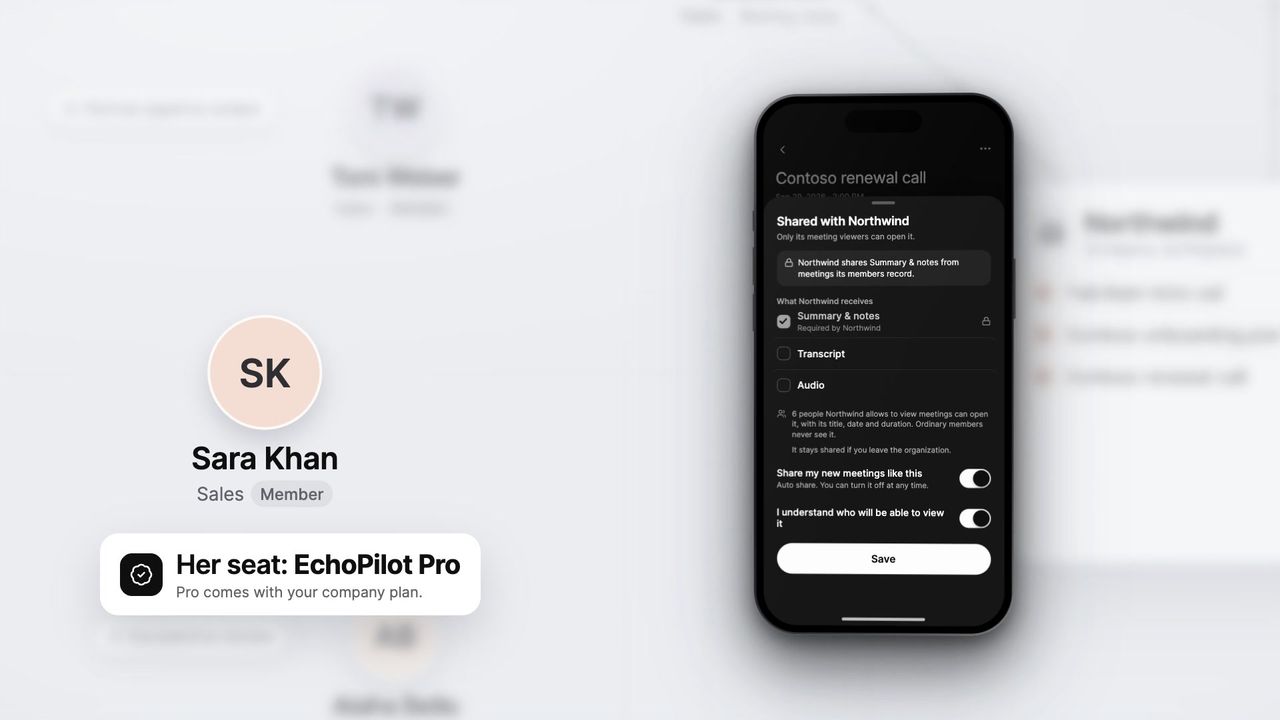
Shared by choice
A meeting enters the workspace when the person who recorded it shares it: the summary and notes, and the transcript or audio only if they include them.
Roles decide who sees it
Meeting viewers and executives open what was shared. Ordinary members never see each other’s meetings, and an admin sees no content unless given access.
Ask across the company
Ask a question and get the answer from every shared meeting you can open, with the meetings it came from. Ask reads nothing that was not shared.
Briefs, daily and weekly
A brief every morning and a weekly one on Mondays, written from the shared minutes: the decisions, the blockers and what carried over.
EchoPilot for companies, in depth.
Every team in a company holds meetings, and what they decide rarely travels past the people in the room. EchoPilot for companies gives those meetings one home. Each person records as they already do and shares what they choose, and the shared meeting minutes from every team sit in one place, where the people who need the outcome can read them, ask them and act on them.
How a meeting reaches the workspace
Everyone records the way they do on their own: the phone on the table in the room, or the Mac and Windows app on a call, with no bot joining. The minutes, the transcript and the follow-ups are written as usual and belong to the person who recorded them.
- Nothing is shared until it is shared. The recorder chooses the workspace and what it receives: the summary and notes, and the transcript or audio only if they tick them.
- Auto share. A member can share their new meetings the same way every time. It covers meetings recorded after they turn it on.
- Sharing the company decides. A company can instead share chosen content, such as the summary and notes, from every meeting its members record. It applies to meetings recorded while it is on, members see it on the workspace and on every sharing panel, and someone seated in two companies is never shared automatically.
Who can open a shared meeting
Each person in the workspace has one role, and only two roles open meetings. Changing a role asks for a reason, and the change is recorded.
- Member. Records and shares their own meetings. Never opens anyone else’s.
- Meeting viewer. Opens every shared meeting, with its transcript and audio where they were shared, asks across them and drafts follow-ups.
- Executive. Everything a meeting viewer can, plus the daily and weekly briefs and the workspace analytics.
- Company admin. Invites and manages people, sets what can be shared, and reads the audit log and the analytics. Sees no meeting content unless given that access.
- Billing admin. Sees the agreement and the seats, and keeps the billing contact current.
- Owner. Holds the workspace: people, billing, settings and the audit log.
What the admin decides
The workspace settings belong to the company admin and the owner.
- Who decides what is shared: each member, with Auto share if they want it, or the company, for chosen content.
- What can be shared at all, from the summary and notes through to the audio.
- When access ends. Invitations go to a person’s verified email, and access can end on a date set in advance, for a contractor or a fixed-term role.
- What happens when someone leaves. Their shared meetings stay with the company by default, or leave with them.
- Whether Ask, the briefs and the analytics are on for the workspace.
Every change, and every meeting anyone opens, lands in the audit log, which the company admin and the owner read.
Ask, briefs and analytics
Ask works across the workspace the way it works across your own meetings: ask a question and the answer comes from every shared meeting you can open, naming the meetings it came from. Ask reads nothing that was not shared, and a reader’s answers change with their access.
The daily brief arrives each morning and the weekly one on Mondays, both written from the shared minutes and never from the audio: the decisions, what is blocked, the commitments with their deadlines, and in the weekly brief, the patterns and what carried over. Executives read them in EchoPilot.
The analytics count meetings, hours, commitments, recurring topics and languages, as trends over days and weeks. They never show figures per person: no ranking, no engagement score.
Pro for every seat
Everyone with a seat gets EchoPilot Pro while they hold it, so their own meeting minutes, longer recordings, speaker turns and translation come with the company plan. A company seat sits alongside anything a person pays for themselves and never replaces it: joining or leaving a company changes nothing they bought.
Company plans are set up with our team rather than bought online, and the price depends on your team. Contact sales and we will reply by email, or compare the plans first.
Questions worth answering.
Do you offer plans for companies?
Who in the company can see a meeting someone shares?
Are my meetings shared with my company automatically?
What do Ask, the briefs and the analytics read?
What happens when someone leaves the company?
Does a bot join my meeting?
Bring your team’s meetings into one place.
Tell us about your team and how it meets. We set up the workspace with you, invite your people and agree the plan, and every seat comes with Pro.
Questions? support@echopilotapp.com