The follow-up,
already drafted.
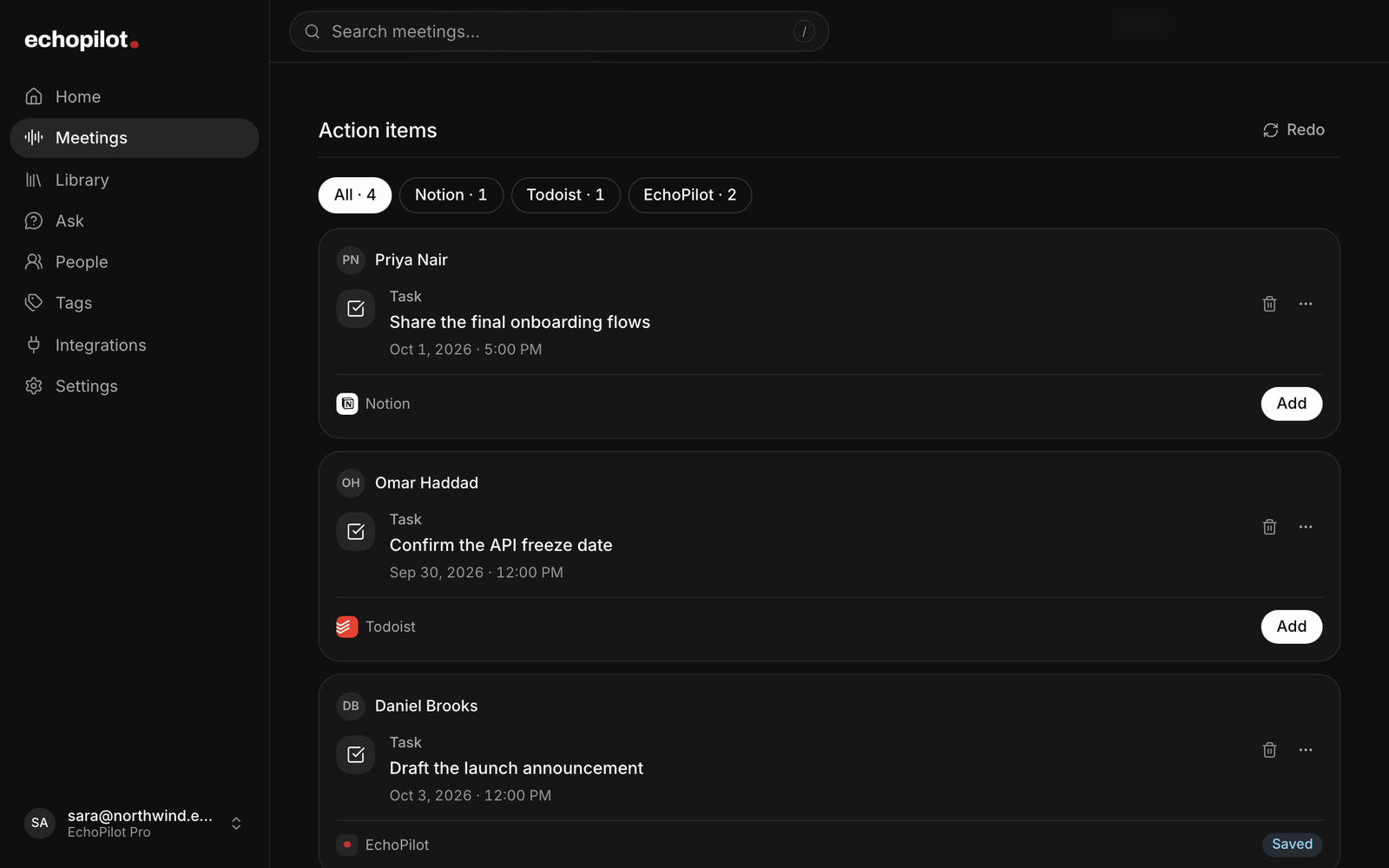
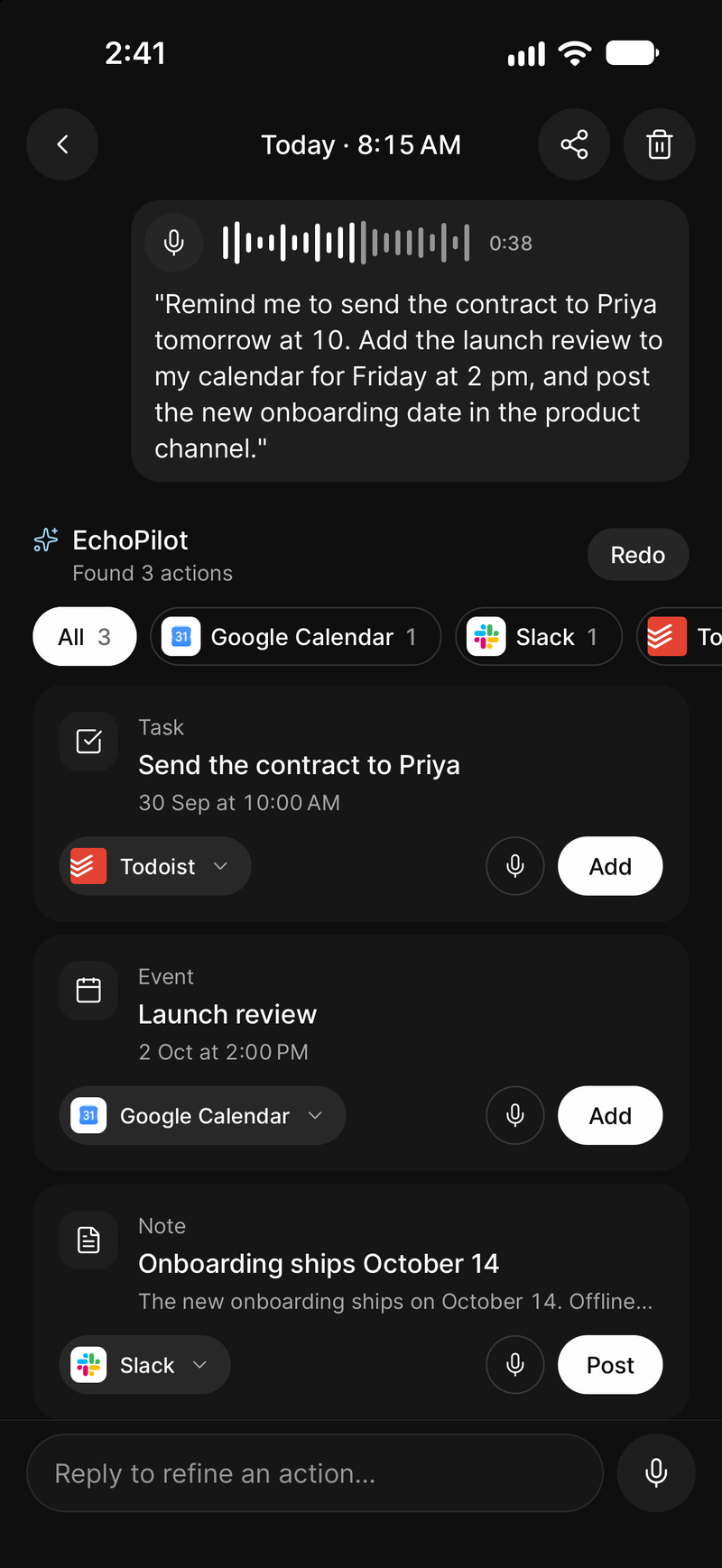
Every commitment in the meeting becomes one card with its destination already chosen. Read it, fix it if the guess was wrong, approve it. Only then does it reach your task app.
- One card per commitment
- Destination already chosen
- Nothing sent until you approve
The part that turns a
recording into progress.
A summary tells you what happened. A card gets it done. EchoPilot reads the finished minutes, finds what someone committed to, and prepares each commitment as a single draft, with the owner and the deadline when they were actually stated.
“Priya will rebuild the Q4 forecast by Friday, and someone needs to send the packaging options to the board on Monday morning.”
EchoPilot read the finished minutes and drafted the six cards on the right. Open one to see why it chose that destination, and where the commitment was said.
Interactive demo Adding a card here is simulated. In the app, nothing is sent until you confirm on the card.
Explicit mention wins. Otherwise your default destination, otherwise EchoPilot's own Library.
One card, not one per app
Ten commitments produce ten cards, not ten multiplied by every integration you have connected. Each goes to the single destination that fits it.
Refine it like a conversation
Reply to a card by voice or text (“make it Thursday”, “send this to Notion instead”) and it updates in place. EchoPilot asks when a request could mean two things.
Redo when the first pass misses
Redo runs the extraction again, told exactly what it got wrong last time. Cards you already added or sent are left untouched.
Drafted, not dumped
Written as a task rather than a quotation, with a due date only when one was said.
The destination is named
Todoist, Notion, a calendar, Slack, a draft email. You see where it goes before it goes.
Nothing leaves without you
Change the destination, edit the wording, discard it. Only your confirmation sends it.
Works before you connect anything
EchoPilot has its own tasks, reminders and notes. Adding them by hand costs no AI quota.
What it looks like
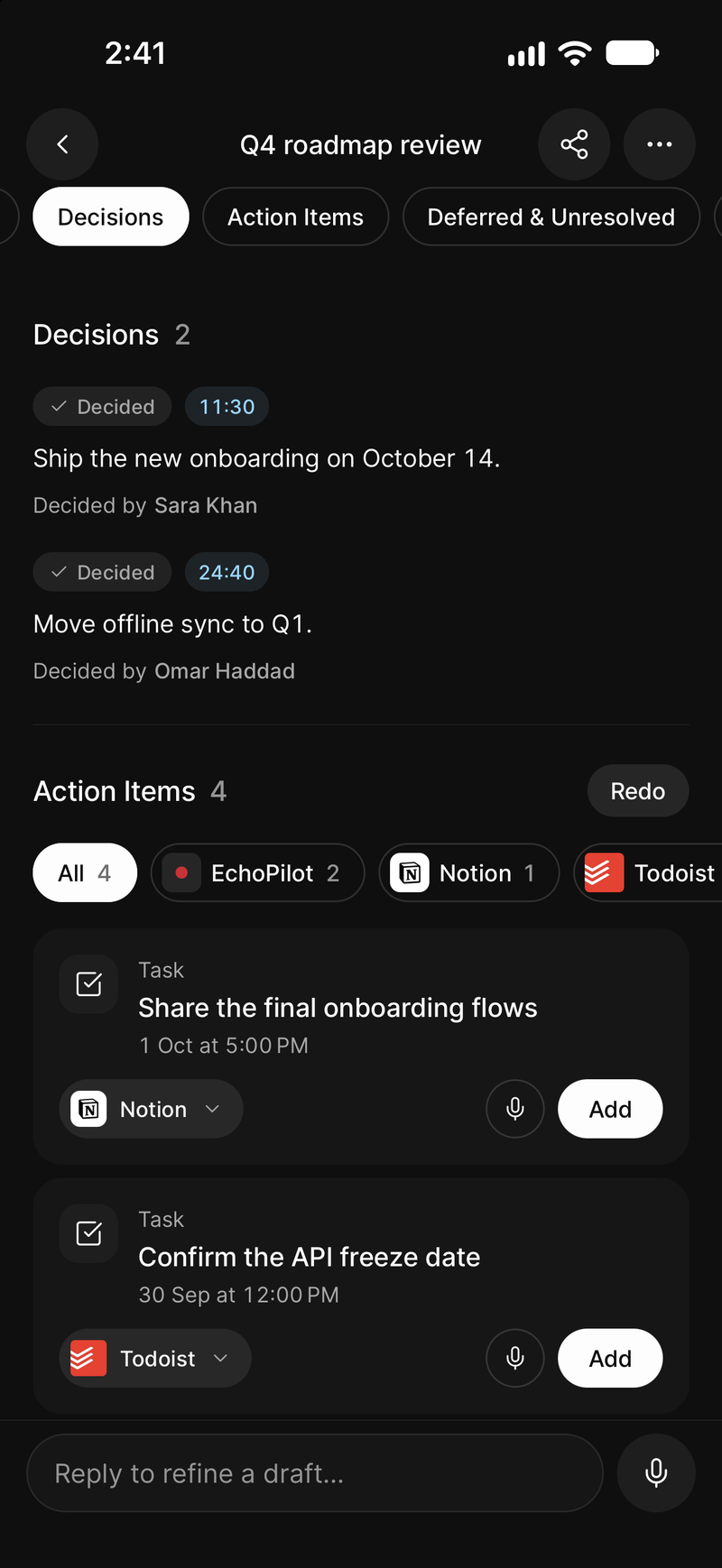
One card per commitment, waiting for approval
-
A spoken note becomes a task, an event and a post
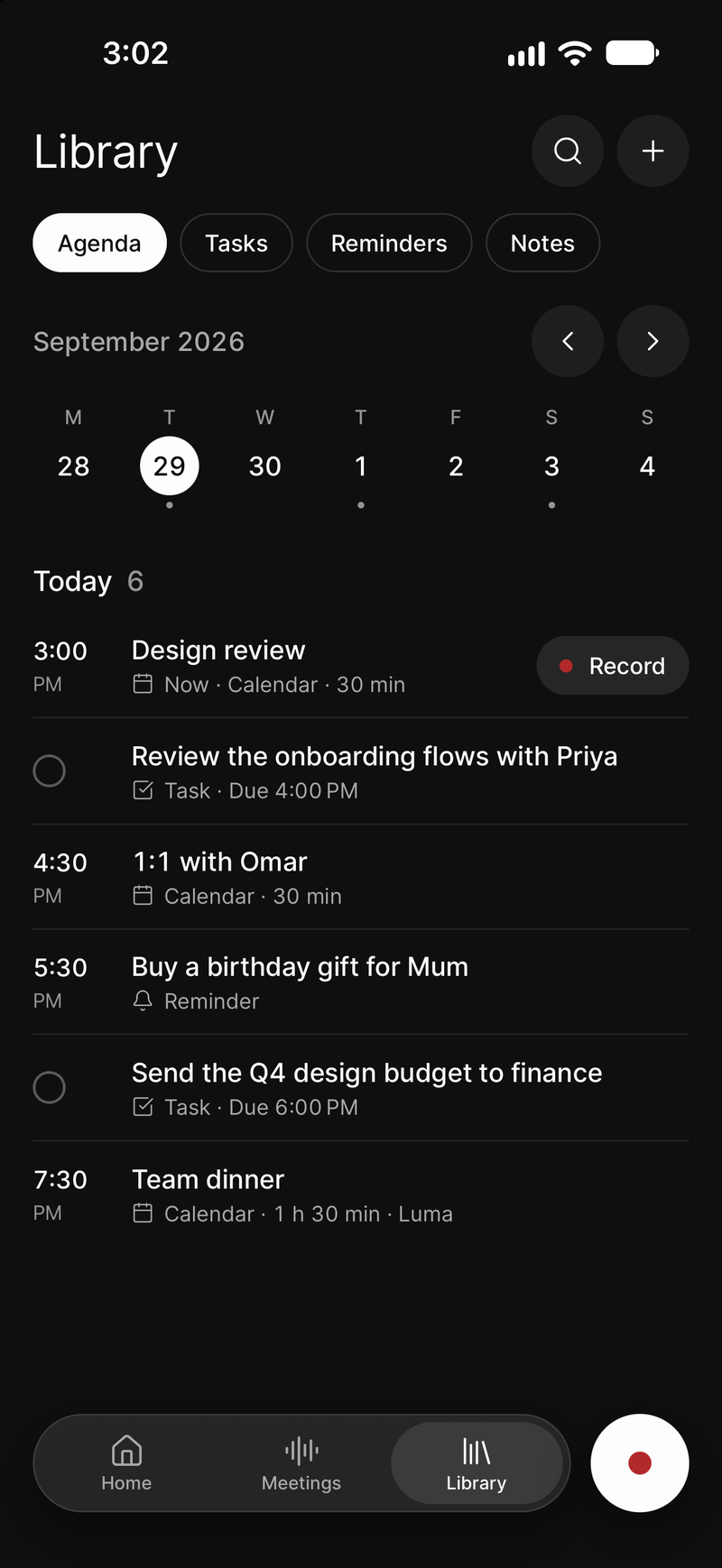
Approved tasks and reminders in your Agenda
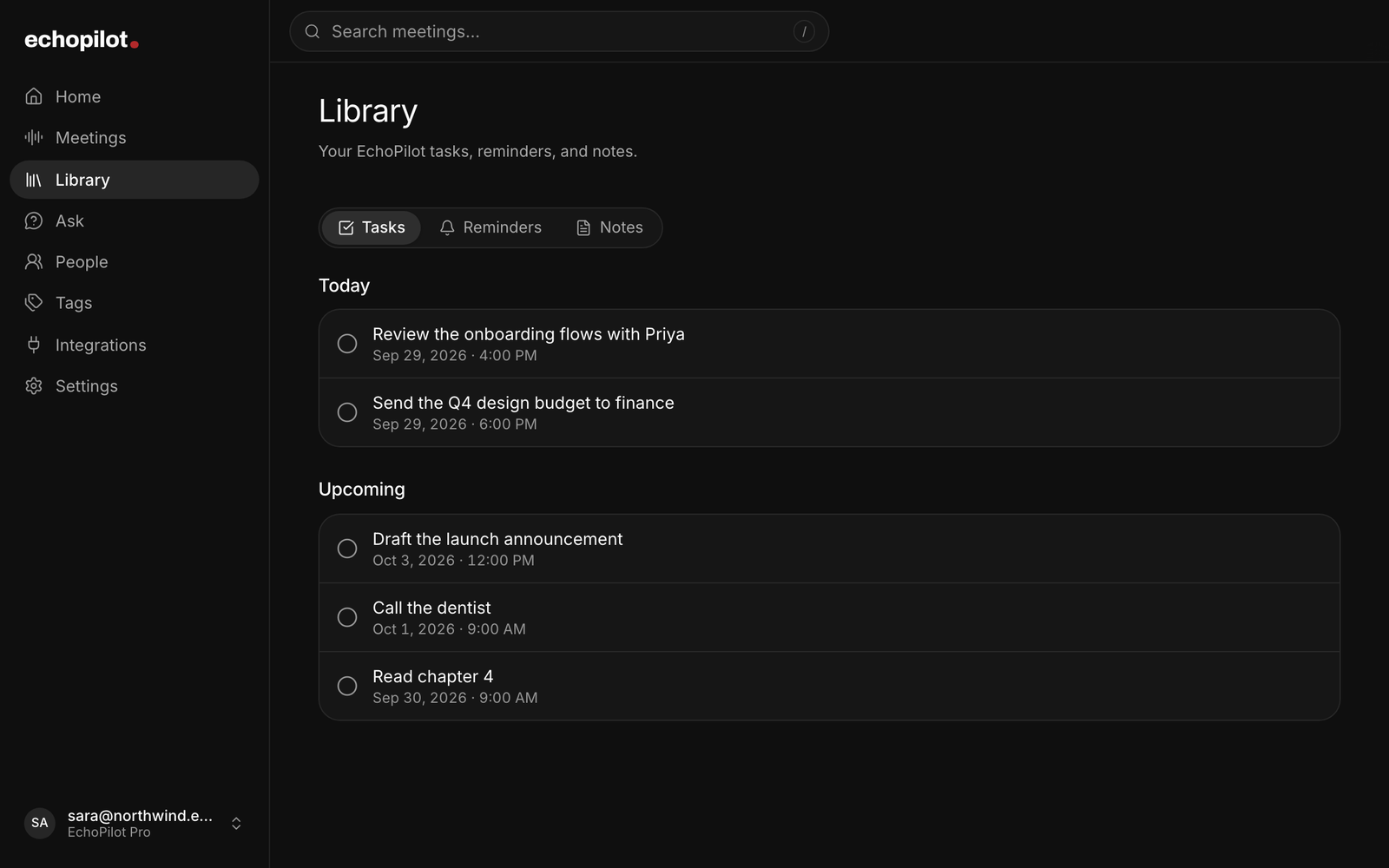
The same Library on the web
Meeting actions, in depth.
Meeting notes do not fail because they are inaccurate. They fail because a list of action items in a document is still work: someone has to read it, decide where each item belongs, and put it there, at the end of a long day. EchoPilot does the tedious part and stops just short of the decision. It is the last stage of an AI meeting assistant that began with the recording.
One card per commitment
When a meeting is processed, EchoPilot finds the commitments and drafts a card for each. A card carries what was agreed, written as a task rather than a quotation, with the detail that was said about it; the destination it picked, named explicitly; the moment in the recording it came from, with the line that was said and the context around it; the owner, when someone was named; and a due date, when one was actually said.
When something that matters is missing, the card says so instead of guessing. A deadline mentioned but never pinned down, a task nobody took, a reminder with no time: each shows as Needs attention on the card, and one edit clears it. Open a card on your phone, on the web or in the desktop app to see all of it and change any field. On a computer, an email card opens as a draft in Gmail, Outlook or your mail app, and an event goes to your calendar app, Google Calendar or Outlook.
Your tasks land in your list, everything else waits
Your own tasks and reminders go straight into EchoPilot’s list, where they remind you on time, and each card keeps an Undo. Commitments someone else made fold into one Follow up line, so the list in front of you is yours. The first time a meeting names people, EchoPilot asks once which of them is you.
Mark a card Not needed and it steps aside. Set aside the same kind of suggestion a few times and EchoPilot shows fewer like it, folded under More suggestions rather than gone, and adding one brings them back.
Nothing leaves EchoPilot until you approve it
There is no setting to turn this off. Nothing is created, updated or sent outside EchoPilot until you confirm the card in front of you. Change the destination if the guess was wrong, edit the wording, discard a passing remark. Only your confirmation reaches the app it names, and a card is never offered a destination that already holds the same item.
A tool that silently sends things on your behalf is a tool you have to audit, and auditing it is more work than doing the work yourself. A tool that drafts and waits at the edge of your other apps is one you can hand the tedious part to and still own the result.
Where approved actions go
EchoPilot’s own Library holds tasks, reminders and notes if you would rather keep everything in one place. Beyond that: Todoist, Google Tasks, Google Calendar, Google Drive, Slack, Notion, Microsoft To Do, Outlook Calendar, Outlook Mail, OneNote, OneDrive and Teams, Apple Reminders, Apple Notes, the device calendar, a prefilled WhatsApp handoff, and Mail drafts. Availability varies by platform and by the accounts you have connected; Gmail and Google Chat are not destinations. Every integration is opt-in, with credentials encrypted at rest.
Reminders that actually interrupt
Some commitments are moments, not tasks: call them back at four, leave for the airport at six. EchoPilot’s reminders are alarm-style and hold the screen rather than waiting in a notification list you will find tomorrow. That is right for the few things that cannot slip and wrong for everything else, which is why ordinary tasks go to your task manager.
Follow-up drafts
Ask for a change on an existing card, in your own words, and the revised draft appears on that card: the new wording, or each changed field with its old and new value. Review it, edit the wording if needed, then Apply or Discard. Applying changes the EchoPilot card; sending or updating an external app still requires your confirmation.
Not every outcome is a task. Sometimes the meeting produced a message: a summary for the client, a confirmation for the person who asked, a note for someone who was not there. EchoPilot drafts those the same way: it writes it, shows it to you, and sends nothing until you approve it.
What this does not claim
Reviewable action cards. Nothing is created outside EchoPilot until the card is approved.
Your own tasks added for you, with Undo. Only tasks and reminders that are yours, and only in EchoPilot's own list. Anything for another app, and anything someone else promised, waits as a card you approve.
Guides
- GuideAction items vs decisions vs notes: what goes where in meeting minutesA decision changes what is true, an action item changes who does what next, and a note explains why. How to tell them apart in a real meeting, with the edge cases that trip people up.
- GuideHow to turn meeting notes into tasks, without creating work nobody agreed toEvery meeting produces more suggestions than commitments. What counts as a task, how to give each one an owner, a date and a home, and how to let a tool do the tedious part without it creating work that nobody in the meeting actually agreed to.
- GuideMeeting follow-up email template, with three examplesA follow-up email that gets read has four parts, sent the same day. The template, three worked examples for a client, a project team and a new supplier, and the mistakes that make people ignore it.
Questions worth answering.
Does EchoPilot create tasks automatically?
Which apps can EchoPilot send actions to?
What is in a set of EchoPilot meeting minutes?
Your next meeting can end with the work already drafted.
Install EchoPilot on the phone or the computer you already work on, record the next conversation you would otherwise try to remember, and read the minutes, the transcript and the drafted actions it gives you back.
Questions? support@echopilotapp.com