Every showing, written up. Every follow-up, drafted.
Record the showing on your phone, even with no signal, or the client's video call on your computer with nothing joining it. EchoPilot writes Real estate notes with the requirements, the budget, each property and what the client thought of it, the offers and the next steps.
- Showings recorded on your phone, even offline
- No bot in a client’s video call
- Nothing sent until you approve it
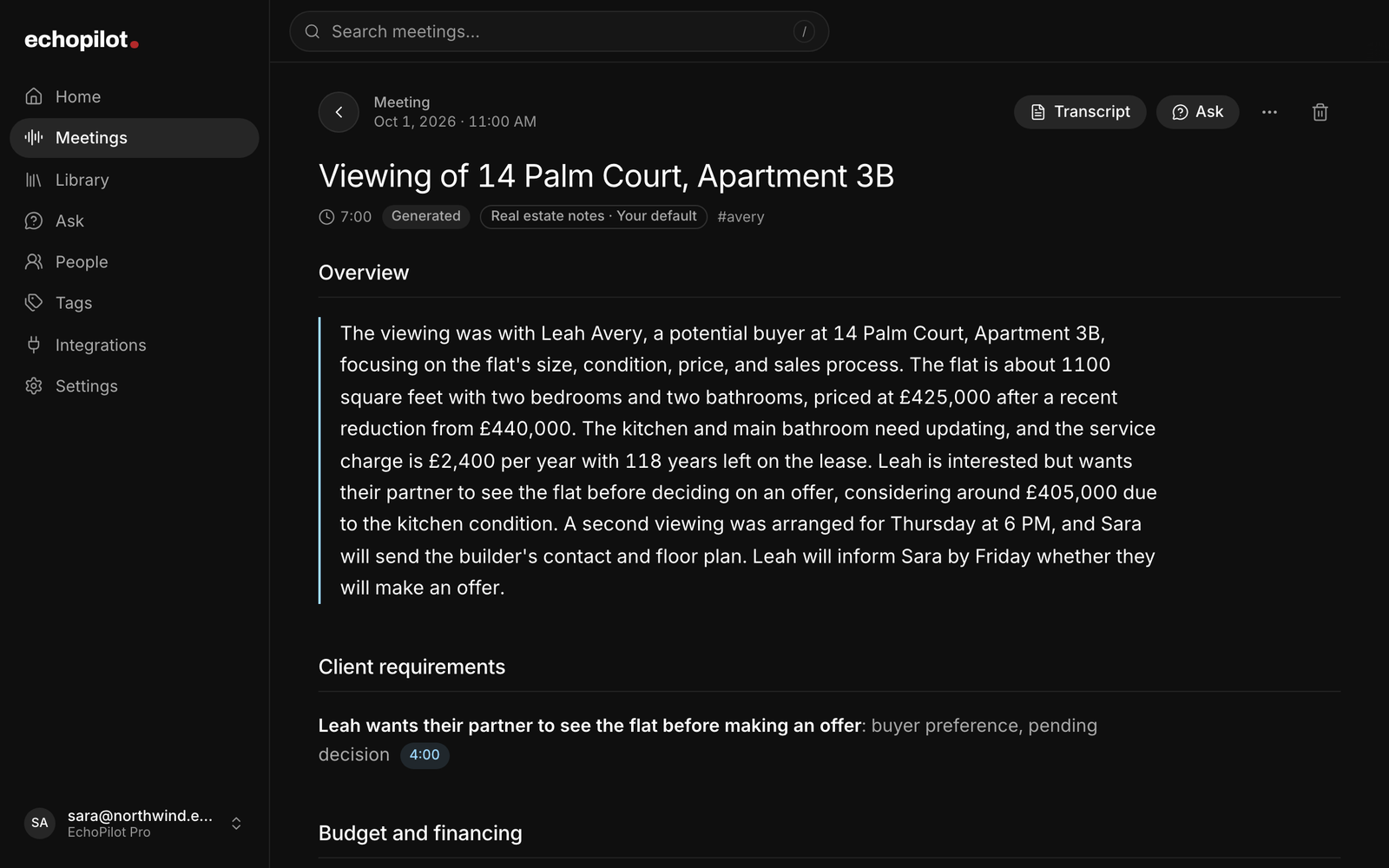
At the property or on a call
Your phone records the showing, signal or not. The Mac or Windows app records a client’s video call from the computer’s own audio, with nothing joining it.
Notes in an agent’s terms
Client requirements, budget and financing, each property with its feedback, offers, concerns, viewings and follow-ups, written by the Real estate notes template.
Ask what was said
Which property had the smaller second bedroom? What did they say about the service charge? Answers cite the moment, so you can play it.
Follow-ups, drafted
The second viewing, the documents to send and the call to make come back as tasks and events you approve into your own apps.
What it looks like
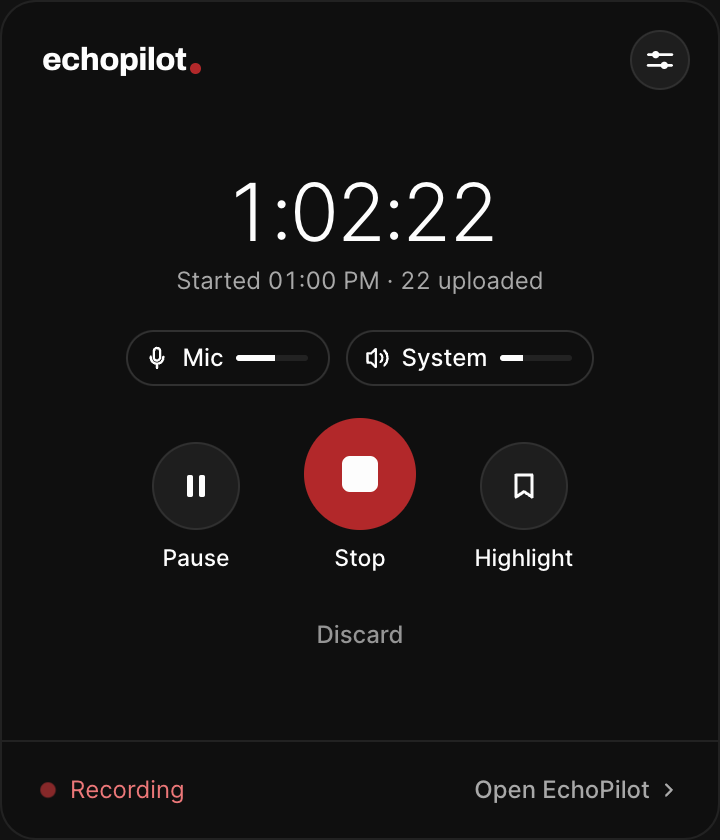
A client video call, recorded on your computer
-
Requirements and budget, each tied to the moment it was said
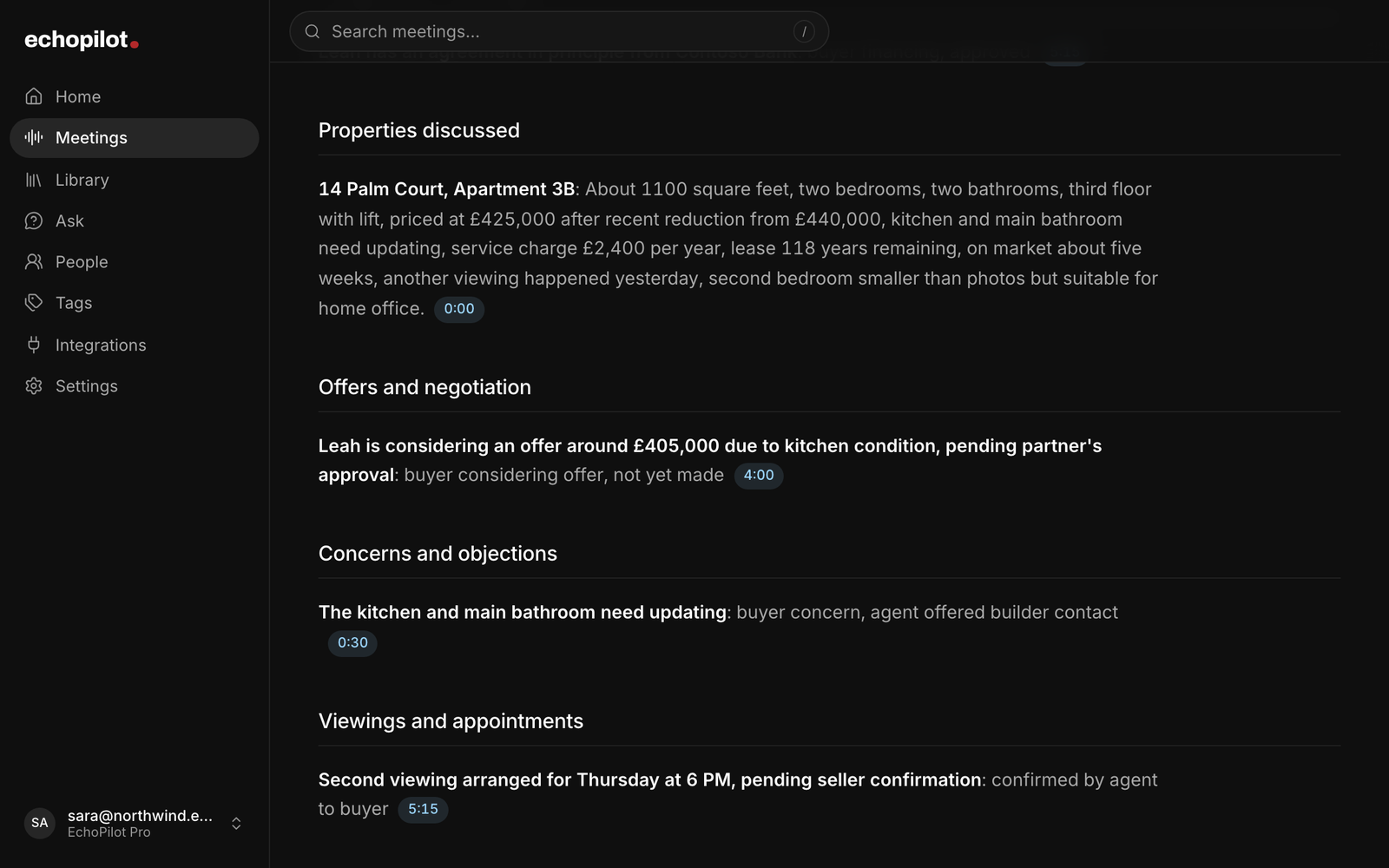
Each property with its feedback, and where the offer stands
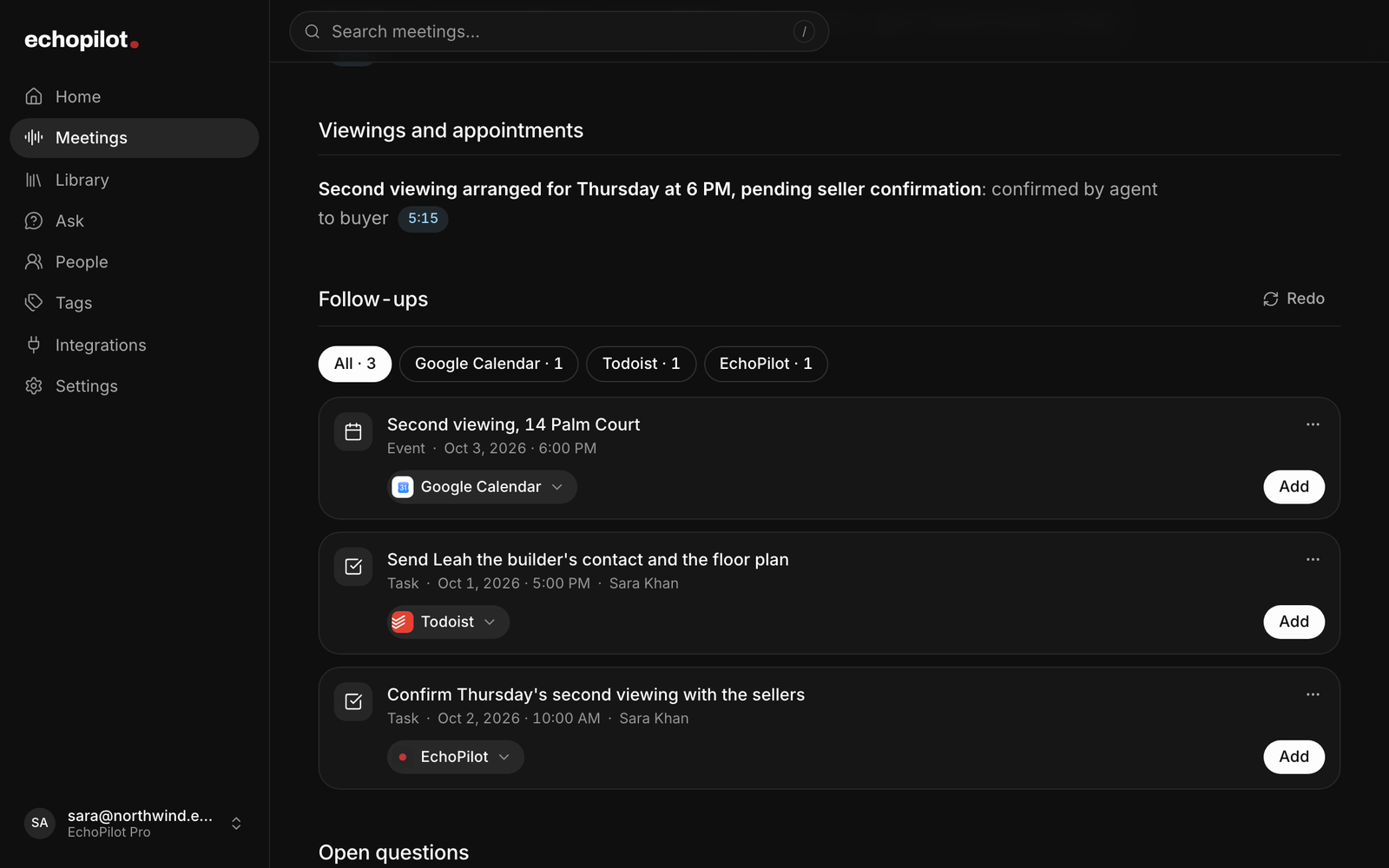
The second viewing and the follow-ups, waiting for approval
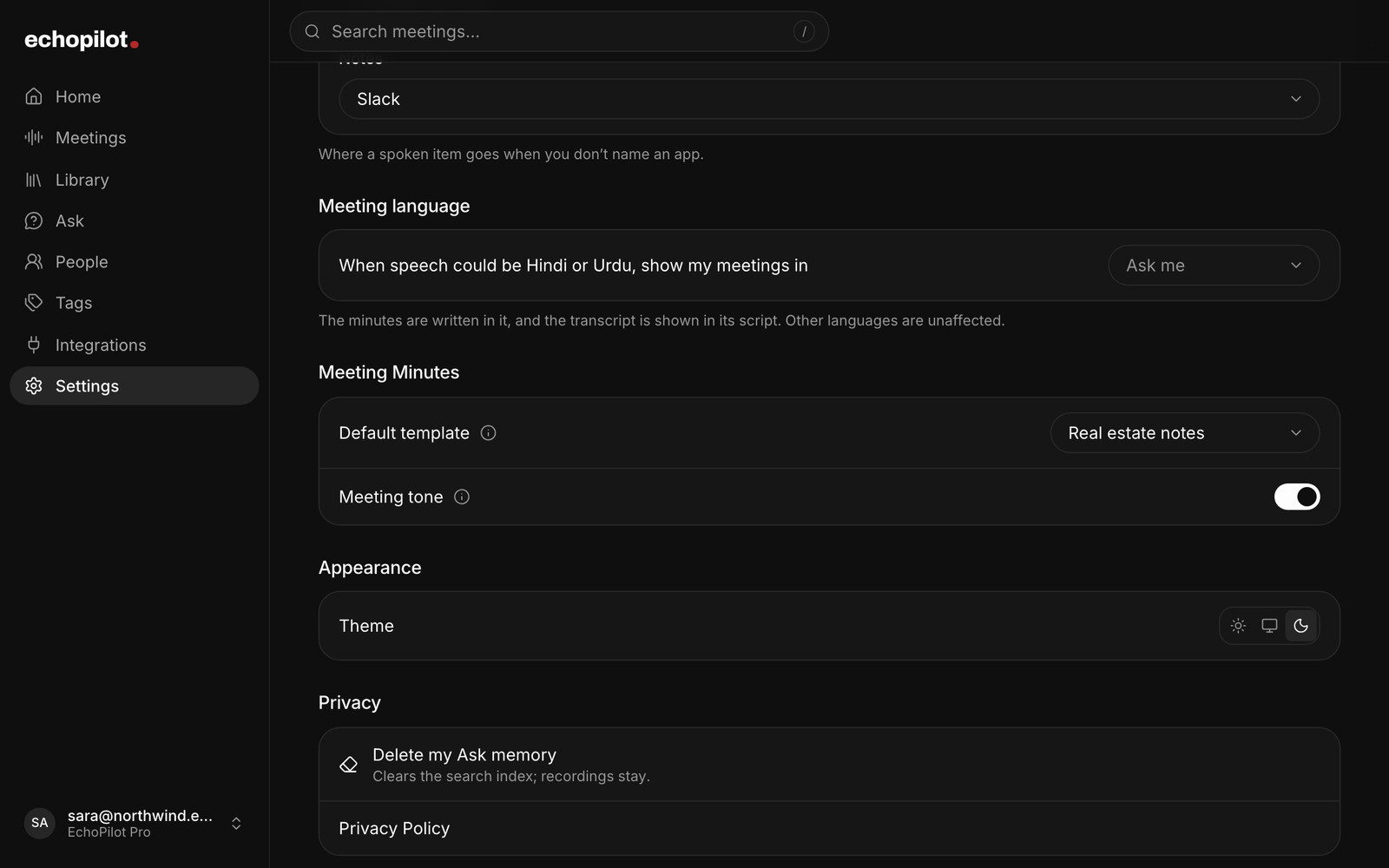
One setting makes Real estate notes the default
For real estate agents, in depth.
By the next showing, the last one has already blurred: what the buyer said about the second bedroom, the figure they mentioned, what you promised to send. Record the conversation instead. EchoPilot is an AI meeting assistant that writes a property conversation up as Real estate notes: what the client wants, what they can spend, what they thought of each property, where the offer stands, and the follow-ups, each one tied to the moment it was said.
Record the showing, the consultation and the call
At a property, put your phone in your pocket or on the counter and press record. It keeps recording with the screen locked and the app in the background, and a recording made with no signal (a basement, a new build, a rural lot) stays on the phone and uploads itself once you are back online. A buyer consultation in your office or a listing appointment at the seller’s kitchen table is recorded the same way, as an in-person meeting.
When the client is on a video call, the Mac and Windows app records the audio your computer is playing along with your microphone. Nothing joins the call, so the client sees no bot and no extra participant. Tell them you are recording all the same. On Mac, capturing the computer’s audio needs macOS 14.2 or later.
Showings are called viewings in the UK and the UAE, and EchoPilot treats them the same way. The web app is where you review, search and ask on a laptop. It does not record.
Real estate notes, written for an agent
A property conversation comes back in the shape you work in, with each section shown only when the conversation reached it:
- Overview: who it was with, what it was for, where things stand and what happens next.
- Client requirements: property type, bedrooms and bathrooms, the area, must-haves, deal-breakers and timing, in the client’s words and attributed to them.
- Budget and financing: the price range, the deposit, cash or mortgage, a pre-approval or agreement in principle, exactly as the figures were said, with their currency.
- Properties discussed: each property, the details stated about it, and the client’s reaction, which is your showing feedback.
- Offers and negotiation: offers, counteroffers, terms and conditions, and whether a figure was offered or only considered.
- Concerns and objections: price, condition, fees, timing, and how each was answered.
- Viewings and appointments: second viewings, valuations and inspections that were arranged, with the time as stated.
- Follow-ups: what you and the client each said you would do.
Figures stay as they were said: a budget is not rounded, a currency is not converted and no payment is calculated. A section the conversation never reached stays empty rather than being filled in, and what a client says about an area is recorded as their words, not as a judgement of the neighbourhood. The full transcript sits underneath, and every note plays the moment it came from. Real estate notes are written for a recording made on any device, and open in full on the web and in the Mac and Windows app.
One example, start to finish
The screens on this page show a flat viewing in a sample account. The buyer liked the living room, found the second bedroom small and the kitchen dated, named a figure they were thinking about without making an offer, and asked to come back with their partner. The notes list the property with its details and that feedback, record the figure as considered rather than offered, put the service charge and the kitchen under concerns, and turn the second viewing and the documents the agent promised into follow-ups.
Buyer and seller consultations
A first meeting with a buyer is mostly questions: where, how big, how much, how soon, and what would rule a home out. Real estate notes collect the answers into the client’s brief, so the search starts from what they said rather than from memory. With a seller, the same sections hold their price expectations, timing and conditions, and the listing appointment’s next steps.
Showings and negotiations
Record each showing and the feedback is written while it is fresh: what they liked, what put them off, and anything you need to check. Across a day of showings, Ask can compare them: which home had the bigger garden, what they said about the commute, where the second bedroom was too small. Answers come from the recordings and cite the moment, so you can play the sentence before you rely on it. Tag recordings by client and ask across exactly those.
During a negotiation call, the offers section keeps each figure, who made it and its status as it was said, so a counteroffer is never confused with a number someone was only thinking about.
Make Real estate notes your default
If most of your recordings are with clients, choose Real estate notes as your default template in Settings, on the web or in the Mac and Windows app. Every meeting you record from then on is written with it, whichever device recorded it, and each one shows which template wrote it. Your default is never changed for you. When a recording is clearly something else, a training session for instance, the meeting offers once to rebuild it with the template that fits, and Dismiss means it never asks about that meeting again. Rebuilding never re-records or re-transcribes anything, and the previous notes stay in the version history.
Follow-ups, as cards you approve
Every commitment in the conversation becomes an action card: a calendar event for a second viewing with a time, a task to send the floor plan or chase the mortgage paperwork, a reminder for a deadline someone stated, and one note holding the client’s brief. Send them to your calendar, Todoist, Google Tasks, Apple Reminders, Notion, a Mail draft or a WhatsApp message. Nothing is created or sent anywhere until you approve that card.
Ask before you record
Recording rules differ by country and by state, and some places require everyone in the conversation to agree, in person as well as on a call. Tell clients you record so the notes are accurate and use the recording for nothing else. If someone would rather not be recorded, or at an open house full of visitors, record a voice note of your own straight afterwards instead. The recording consent guide covers the general rules; it is not legal advice.
What EchoPilot does not do
EchoPilot has no CRM or MLS integration, so notes do not appear in your CRM by themselves: export them as a PDF, Markdown or plain text and copy them across. It does not record phone calls; it records the room on your phone and video calls on your computer. It does not import audio files. And nothing joins a call as a bot.
Free and Pro
Free is a permanent plan with real meeting minutes each month, enough to try Real estate notes on your own showings; Pro adds more minutes, longer recordings, switching a recording to another template, translation and speaker turns. The pricing page has every number, read from the product, and the app is on the download page for iPhone, Android, Mac and Windows.
Questions worth answering.
Can I record a showing or a client meeting?
Can every meeting come back as Real estate notes?
Does EchoPilot sync with my CRM or the MLS?
Does a bot join my meeting?
What happens if I lose signal during a meeting?
What do I get on Free, and what does Pro add?
Your next meeting can end with the work already drafted.
Install EchoPilot on the phone or the computer you already work on, record the next conversation you would otherwise try to remember, and read the minutes, the transcript and the drafted actions it gives you back.
Questions? support@echopilotapp.com